

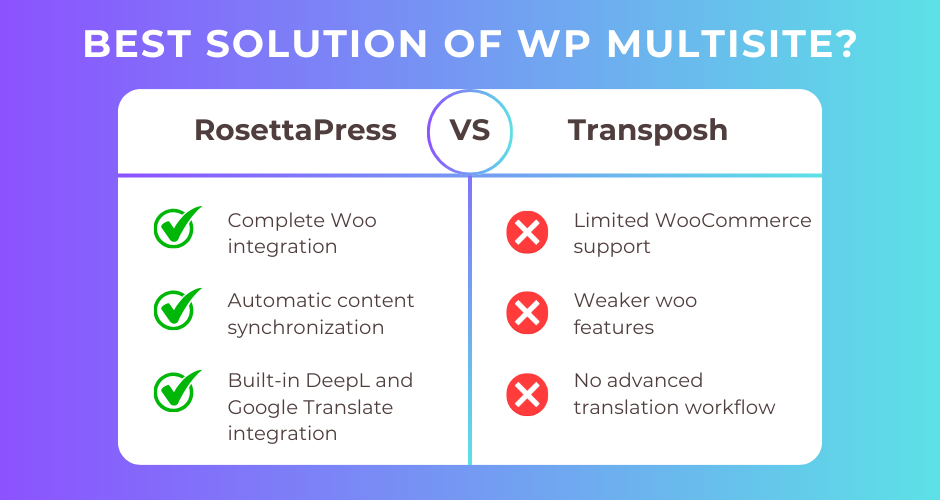
RosettaPress is a premium WordPress Multisite translation plugin designed exclusively for network installations, offering automatic cloning, DeepL and Google Translate integration, and comprehensive WooCommerce support with centralized inventory management. Transposh is a free, open-source hybrid translation plugin that combines automatic machine translation with crowdsourced human corrections through an in-context editing interface, supporting over 100 languages since 2008.
This article breaks down the key differences between these two plugins, comparing their architecture, features, pricing, and ideal use cases to help you make the right choice for your multilingual WordPress project.
Quick Comparison Summary
| Feature | RosettaPress | Transposh |
|---|---|---|
| Best For | Enterprise multisite networks with WooCommerce | Content sites with community translation |
| Pricing | $99-$299/year | Free (open source) |
| Ease of Use | Moderate (requires multisite expertise) | Moderate to High |
| Key Strength | Complete WooCommerce integration with stock sync | Crowdsourced in-context translation editing |
| Key Weakness | Requires WordPress Multisite infrastructure | Limited WooCommerce support |
RosettaPress Overview
RosettaPress is a premium WordPress translation plugin built exclusively for WordPress Multisite installations. Released by WPify, it follows a network-based architecture where each language operates as a separate site within a multisite network, providing complete data isolation between language versions while maintaining translation relationships through custom database tables.
The plugin’s core approach centers on automatic content cloning from a designated primary site to secondary language sites, with support for manual translation linking, automatic machine translation via DeepL or Google Translate, and comprehensive synchronization of content, meta fields, and taxonomies. RosettaPress treats translation as a network-level operation, enabling centralized management of multilingual content across an entire WordPress installation.
Designed for enterprises, agencies, and WooCommerce stores requiring dedicated sites per language, RosettaPress provides extensive developer tools including a REST API, WP-CLI commands, and numerous PHP filters and actions. The plugin’s WooCommerce integration stands out with features like stock synchronization across language sites, product variation translation, cross-sell/upsell ID mapping, and a network-wide orders dashboard.
The plugin requires PHP 8.1+ and WordPress Multisite, positioning it as a solution for technically sophisticated users who need professional-grade multilingual capabilities with complete language separation.
RosettaPress Pros
- Complete WooCommerce integration with stock synchronization across language sites
- Automatic content cloning and synchronization from primary to secondary sites
- Built-in machine translation via DeepL and Google Translate with caching
- Comprehensive ACF support including repeaters, flexible content, and all field types
- Extensive REST API and WP-CLI support for automation
- Site cloning feature for rapid language site deployment
- Network orders dashboard for unified e-commerce management
- Strong developer extensibility with numerous filters and actions
- Elementor content translation support
RosettaPress Cons
- Requires WordPress Multisite infrastructure (not suitable for single-site installations)
- Higher cost compared to free alternatives
- Machine translation requires external API usage (potential ongoing costs)
- No built-in translation workflow or approval process beyond automatic cloning
- Steeper learning curve due to multisite architecture requirements
Transposh Overview
Transposh is a free, open-source WordPress translation plugin that has been actively maintained since 2008. It pioneered a hybrid approach combining automatic machine translation with crowdsourced human corrections, allowing website visitors to improve translations directly on the frontend using an intuitive in-context editing interface.
The plugin operates as a content filter, parsing and translating text on-the-fly as pages render. All translations are stored locally in the WordPress database, making it independent of external translation memory services. Transposh supports over 100 languages with full Right-to-Left (RTL) and Left-to-Right (LTR) layouts, integrating with multiple translation backends including Google Translate, Bing, Yandex, Baidu, Apertium, and LibreTranslate.
What sets Transposh apart is its wiki-style translation model where anonymous users can contribute translations that are visually marked with color-coded status indicators: red for untranslated, yellow for machine-translated, and green for human-approved content. This crowdsourced approach enables communities to collaboratively improve translation quality over time without professional translator engagement.
Compatible with both single-site and multisite WordPress installations, Transposh includes extensive caching options (APC, APCu, Memcached, Redis) for performance optimization on high-traffic sites. The plugin provides basic WooCommerce integration, BuddyPress support, and the ability to translate external plugin content without requiring .po/.mo files.
Transposh Pros
- Completely free and open-source with no premium tiers
- Innovative crowdsourced translation editing with in-context interface
- Multiple translation backend options (Google, Bing, Yandex, Baidu, Apertium, LibreTranslate)
- Self-hosted translation option via LibreTranslate (no external dependencies)
- Supports 100+ languages including full RTL support
- Extensive caching options for performance optimization
- Works on both single-site and multisite WordPress installations
- Active development and maintenance since 2008
- BuddyPress integration for community sites
- No .po/.mo file management required
Transposh Cons
- Basic WooCommerce integration without comprehensive e-commerce features
- No documented REST API for programmatic integration
- Limited developer API documentation compared to commercial alternatives
- No commercial support options or SLA guarantees
- URL translation feature is experimental and may cause issues
- Anonymous translation contributions may require spam management
- No page builder specific integrations documented beyond basic compatibility
Head-to-Head Comparison
Architecture & Translation Model
RosettaPress uses a multisite-exclusive architecture where each language operates as a completely separate WordPress installation with its own database tables. Content relationships are tracked through network-wide custom tables (rosettapress_translation, rosettapress_translation_content, rosettapress_translation_type). When content is created on the primary site, it’s automatically cloned to secondary sites with full database isolation, meaning posts, pages, and WooCommerce products each receive unique IDs per language site. This approach provides complete separation between languages while maintaining translation linkage for language switching.
Transposh takes a fundamentally different approach using a content filter mechanism. The plugin parses content as pages render and dynamically replaces text with translations stored in local WordPress database tables. All languages coexist within a single WordPress installation, with translations retrieved via jQuery-based content filtering on the frontend. Starting with version 1.0.10, translation processing moved to the backend to reduce client-side workload, with support for multiple caching backends (APC, APCu, Memcached, Redis) to optimize performance.
The architectural difference has significant implications: RosettaPress provides native WordPress features per language (separate admin areas, independent plugin settings, isolated user bases) at the cost of multisite infrastructure, while Transposh offers simpler single-site deployment with unified content management but requires content parsing on every page load.
Winner: RosettaPress – The multisite architecture delivers superior data isolation, native WordPress functionality per language, and better scalability for complex sites, though Transposh wins for simplicity in single-site scenarios.
Ease of Use & Setup
RosettaPress requires WordPress Multisite to be configured before installation, which involves editing wp-config.php, setting up subdomain or subdirectory structure, and understanding network administration. Once multisite is active, the plugin setup involves creating language groups, designating a primary site, configuring automatic cloning rules per post type, and setting up synchronization options. The learning curve is steeper, but the interface is well-organized within the network admin dashboard. Site cloning features streamline the process of creating new language sites by duplicating database tables with search-and-replace functionality.
Transposh can be installed on any WordPress site as a standard plugin. Initial setup involves selecting which languages to enable via drag-and-drop interface, choosing translation backends, configuring API keys for services like Google Translate, and placing language switcher widgets. The in-context editing interface is intuitive – editors simply hover over text to translate it inline. However, understanding the color-coded translation status system, configuring caching for performance, and managing translation approval workflows require technical familiarity.
Both plugins demand technical knowledge, but RosettaPress’s complexity stems from infrastructure requirements while Transposh’s comes from configuration options and optimization settings.
Winner: Transposh – Single-site installation and intuitive in-context editing make it more accessible for users without multisite infrastructure, though RosettaPress provides better guidance once multisite is established.
Content Translation Features
RosettaPress provides comprehensive content translation through automatic cloning. Posts, pages, custom post types, taxonomies, terms, and media are duplicated from the primary site to secondary sites with configurable field synchronization. The plugin supports featured image cloning, post parent relationship preservation, comment status retention, and post password copying. Custom fields and meta data translation includes full ACF support (repeaters, flexible content, groups, relationship fields) and Elementor widget content. Translation linking can be manual (connecting existing content) or automatic (cloning on publish), with synchronization keeping specific fields in sync across translations when content updates.
Transposh uses a filter-based approach translating posts, pages, comments, RSS feeds, meta tags, tooltips, and hidden elements on-the-fly. The plugin supports shortcodes, provides classes for excluding content (no_translate) or displaying language-specific content (only_thislanguage), and can designate post language. Translation history logging tracks changes, with an approval workflow allowing editors to review and approve machine translations. The bulk “Translate All” feature enables mass translation, while database cleanup tools remove unwanted translations.
RosettaPress excels at structured content duplication with relationship preservation, making it ideal for complex sites with custom post types and intricate taxonomy structures. Transposh offers flexibility for mixed-language content and user contributions but lacks native support for custom post types and advanced custom fields in the documentation.
Winner: RosettaPress – Superior handling of custom post types, taxonomies, ACF fields, and Elementor content with automatic cloning and synchronization provides more comprehensive coverage for modern WordPress sites.
WooCommerce Support
RosettaPress delivers enterprise-grade WooCommerce integration designed specifically for multilingual e-commerce. Products, variations, attributes, categories, and tags are automatically translated through the cloning mechanism. Stock synchronization keeps inventory consistent across all language sites in real-time, preventing overselling. Product variations are automatically cloned with their parent products, and cross-sell/upsell IDs are mapped to their translated equivalents. Product galleries synchronize images, custom product fields can be configured for sync, and a network orders dashboard provides unified order management across all language sites. WooCommerce orders and sessions are intelligently excluded during site cloning to prevent data corruption.
Transposh documentation mentions “basic WooCommerce support” without detailed feature specifications. While the filter-based translation approach can translate product titles, descriptions, and meta information visible on frontend pages, there’s no documented support for product variations, attribute translation, stock management across languages, or cart/checkout language persistence. The lack of comprehensive WooCommerce documentation suggests limited testing and integration depth for e-commerce scenarios.
For WooCommerce stores, the difference is substantial. RosettaPress provides a complete multilingual e-commerce solution with inventory management, while Transposh offers basic content translation without the specialized features online stores require.
Winner: RosettaPress – Comprehensive, purpose-built WooCommerce integration with stock sync, variation support, and network orders dashboard makes it the only serious option for multilingual WooCommerce stores.
Automatic Translation
RosettaPress integrates with two premium translation providers: DeepL and Google Translate. API keys are configured per language group, with automatic translation available for post fields, post meta, term fields, term meta, Gutenberg blocks, and Elementor widgets. The plugin includes intelligent HTML tag handling, formality settings for DeepL, translation caching to files for cost reduction, and language code normalization for API compatibility. Bulk translation is available via REST API with options to skip already-translated content. The system handles nested Gutenberg blocks by extracting translatable strings while preserving block structure and skips non-translatable content like CSS variables and background images.
Transposh offers significantly more translation backend flexibility, supporting Google Translate, Bing Translator, Yandex, Baidu, Apertium, and LibreTranslate. The LibreTranslate option is particularly valuable for organizations wanting self-hosted translation without external API dependencies. Server-side translation processing (introduced in v1.0.10) handles batch operations, with progress bars showing automatic translation status. All translations are stored locally in the database, creating a translation memory over time. The “Translate All” bulk feature enables mass translation of existing content.
RosettaPress provides more sophisticated block-level translation with better structure preservation, while Transposh wins on provider flexibility and self-hosted options. For organizations concerned about API costs, Transposh’s LibreTranslate support offers a compelling advantage.
Winner: Tie – RosettaPress offers superior translation quality for structured content (Gutenberg, Elementor) with better caching, while Transposh provides more backend flexibility and self-hosted options via LibreTranslate.
SEO Capabilities
RosettaPress generates hreflang tags via wp_head integration, automatically linking translated content across language sites. Each language site has its own URL structure (subdomain, subdirectory, or custom domain), providing native SEO benefits. Translated URL slugs are automatically generated from translated post titles, and canonical URL handling operates independently per site. Each language site can have its own sitemap (via WordPress native sitemaps or SEO plugins), and cross-site permalink resolution ensures language switchers link to correct translated content. For WooCommerce, shop page permalinks are properly handled across language sites.
Transposh supports hreflang generation, SEO-friendly subdirectory URLs, and translates meta titles, descriptions, and keywords. The plugin integrates with XML Sitemap Generator v4+ for multilingual sitemap generation and provides canonical URL handling with rel=alternate language marking. Translated content is searchable by search engines and WordPress’s internal search. However, the experimental URL translation feature may cause 404 errors when different default-language strings resolve identically in target languages.
Both plugins handle core SEO requirements, but RosettaPress’s multisite architecture provides more natural SEO advantages with completely separate URLs and independent SEO plugin configurations per language. Transposh’s single-site approach requires more careful configuration to avoid duplicate content issues.
Winner: RosettaPress – Native URL separation per language site, independent sitemap generation, and compatibility with site-specific SEO plugin configurations provide superior SEO capabilities.
Performance & Scalability
RosettaPress optimization focuses on efficient database queries with proper indexing on translation lookup tables, DeepL translation response caching to files, batch translation processing via REST API, and skipping already-translated content during bulk operations. The site cloning process handles large databases through pagination (5000 rows per chunk), and minimal cross-site queries are achieved through batch operations. The multisite architecture naturally distributes load across language sites, each with independent caching and optimization.
Transposh provides extensive caching options including APC, APCu, XCache, eAccelerator, Memcached, and Redis support. The plugin uses negative caching and pre-fetching with single MySQL queries (achieving ~70% performance improvement according to documentation). Version 1.0.10 moved translation processing from client-side to backend, significantly reducing frontend workload. For resource-heavy sites, the documentation recommends local memory caching backends, with a caching statistics widget helping administrators monitor performance.
The performance comparison favors RosettaPress for large, complex sites due to load distribution across language sites, while Transposh requires more caching optimization but offers flexibility for single-site installations. Content parsing overhead in Transposh can impact page load times on uncached pages, whereas RosettaPress serves native WordPress content without translation filtering.
Winner: RosettaPress – Multisite architecture naturally distributes load and eliminates translation filtering overhead, providing better performance at scale with less optimization required.
Developer Experience
RosettaPress provides a comprehensive REST API (rosettapress/v1 namespace) covering posts translation, terms translation, WooCommerce products and attributes, site management, automatic translation, and language switcher preview. WP-CLI support includes commands for site cloning and management. The plugin exposes 25+ PHP filters for modifying clone behavior, synchronization rules, automatic translation settings, and content processing. Actions hooks trigger at key points (post cloned, term cloned, after sync). A dependency injection container (PHP-DI) with repository pattern enables clean code extension. Rotating file logging aids debugging, and all REST endpoints include permission callbacks for security.
Transposh documentation reveals limited developer features. A global function transposh_get_current_language() is available for language detection, and filter hooks exist for language constants and parser behavior modification. The pluggable widget architecture allows custom widget creation, and debug mode with FirePHP and Chromelogger support aids troubleshooting. However, there’s no documented REST API, limited JavaScript API information, and sparse PHP API documentation beyond the global function.
For developers building custom integrations, extending functionality, or automating translation workflows, RosettaPress provides significantly more extensibility points and documentation.
Winner: RosettaPress – Comprehensive REST API, WP-CLI support, extensive filter/action hooks, and modern architecture with dependency injection provide superior developer experience.
Pricing
RosettaPress is a commercial plugin with three license tiers based on multisite count:
| Plan | Price | Sites | Support & Updates |
|---|---|---|---|
| Small | $99/year | 1 multisite | 1 year |
| Medium | $199/year | 5 multisites | 1 year |
| Agency | $299/year | Unlimited multisites | 1 year |
All features are included in the core plugin with no separate paid add-ons. The cost covers plugin updates and support but does not include API costs for DeepL or Google Translate, which vary based on usage.
Transposh is completely free and open-source, distributed under a GPL-compatible license with no premium tiers or paid add-ons. The project accepts donations to support development but places no restrictions on usage. However, translation API costs from providers like Google Translate or Bing still apply based on each service’s pricing structure.
The pricing decision hinges on budget versus features. Transposh’s zero cost is compelling for content sites with limited e-commerce needs, while RosettaPress’s annual fee delivers professional features that justify the investment for WooCommerce stores and enterprise multisite networks.
Winner: Context-dependent – Transposh wins for budget-conscious projects, but RosettaPress provides better value for WooCommerce and enterprise sites requiring its advanced features.
RosettaPress vs Transposh: Which Should You Choose?
Choose RosettaPress if:
- You’re running or planning a WordPress Multisite installation
- Your site uses WooCommerce and needs synchronized inventory across language sites
- You require professional-grade translation with extensive ACF and Elementor support
- Complete data isolation between languages is important for your architecture
- You need comprehensive developer tools (REST API, WP-CLI, extensive hooks)
- Your project justifies the annual licensing cost for advanced features
- You want centralized management of multilingual networks with site cloning capabilities
Choose Transposh if:
- You have a single-site WordPress installation without multisite infrastructure
- Budget constraints make free open-source solutions necessary
- You want to leverage crowdsourced translations from your community
- Self-hosted translation via LibreTranslate is preferred over external APIs
- Your site is primarily content-focused without complex WooCommerce requirements
- You value the flexibility of multiple translation backend options
- BuddyPress integration is important for your community site
Alternative consideration: If neither plugin fits perfectly, WPML offers a middle-ground solution with single-site support, professional translation management, and comprehensive WooCommerce integration, though at a higher price point than RosettaPress.
Frequently Asked Questions
Can I use RosettaPress on a single WordPress site without Multisite?
No, RosettaPress requires WordPress Multisite and will not function on single-site installations. The plugin’s entire architecture depends on the multisite network structure, with each language operating as a separate site. If you cannot or do not want to use WordPress Multisite, Transposh or alternatives like WPML and Polylang would be more appropriate choices.
Does Transposh support professional translation management workflows?
Transposh includes basic translation approval with color-coded status indicators (red for untranslated, yellow for machine-translated, green for human-approved), but it lacks comprehensive translation workflow management features found in enterprise solutions. There’s no built-in system for assigning translations to specific translators, tracking translation progress across multiple users, or managing translation agency collaboration. The plugin is better suited for crowdsourced community translation than formal professional workflows.
How does stock synchronization work in RosettaPress for WooCommerce?
RosettaPress synchronizes WooCommerce stock quantities in real-time across all language sites in a network. When a product is purchased on any language site, the stock level updates across all connected sites automatically. This prevents overselling and maintains inventory consistency regardless of which language site processes the order. The network orders dashboard provides a unified view of all orders from every language site for centralized management.
Can I migrate from Transposh to RosettaPress or vice versa?
Migration between these plugins is challenging due to fundamentally different architectures. RosettaPress stores content as separate posts/pages on different sites with translation relationships in custom tables, while Transposh stores translations as string replacements in database tables. There are no official migration tools, so transitioning would require manual content recreation or custom development. Consider your choice carefully before investing significant translation effort.
Do both plugins work with Gutenberg and modern page builders?
RosettaPress has documented support for Gutenberg blocks and Elementor widgets, with automatic translation extracting translatable strings while preserving block structure. Transposh works with Gutenberg through its content filtering approach but lacks specific page builder integrations in the documentation. For advanced page builder usage (Elementor, Divi, Beaver Builder), RosettaPress provides more reliable, tested support.
Final Thoughts
The choice between RosettaPress and Transposh ultimately depends on your infrastructure, budget, and feature requirements rather than one plugin being universally superior to the other.
RosettaPress is the clear choice for WordPress Multisite installations, WooCommerce stores, and enterprise sites requiring complete language separation with professional features. The automatic cloning, comprehensive WooCommerce integration, ACF support, and developer tools justify the annual licensing cost for projects where these capabilities are essential. The plugin’s modern architecture and extensive API make it a solid foundation for complex multilingual sites that will scale with your business.
Transposh remains valuable for single-site WordPress installations, budget-conscious projects, and community sites where crowdsourced translation contributions enhance content quality. The free, open-source nature combined with multiple translation backend options provides flexibility without financial commitment, particularly appealing for content sites, blogs, and BuddyPress communities.
Ready to make your WordPress site multilingual? If you’re running WordPress Multisite or planning a WooCommerce store, explore RosettaPress for professional-grade features. For single-site installations seeking a free solution, download Transposh from WordPress.org to get started today.