

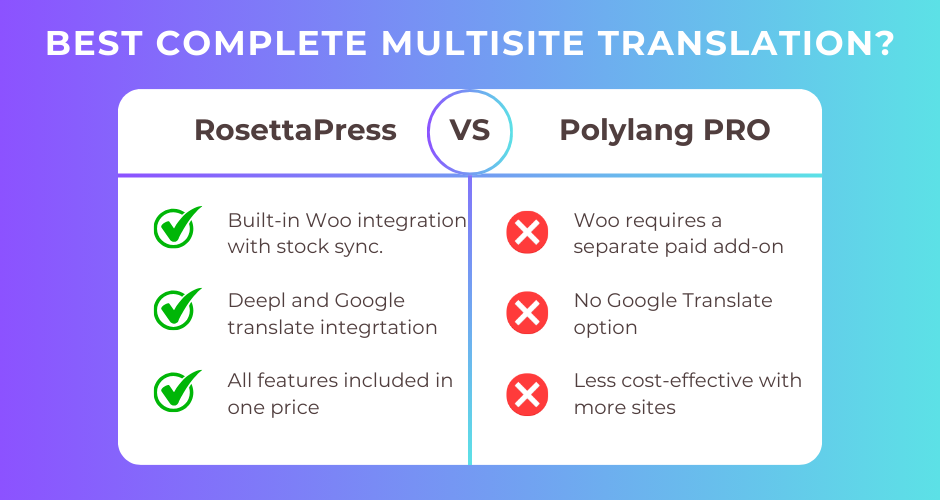
RosettaPress is a WordPress Multisite-exclusive translation plugin that treats each language as a separate site with complete data isolation and comprehensive WooCommerce integration built-in. Polylang Pro is a popular single-site translation solution using WordPress taxonomies to manage translations, with over 800,000 active installations and a 4.7/5 rating on WordPress.org.
This comprehensive comparison will help you understand the fundamental architectural differences, evaluate WooCommerce capabilities, compare automatic translation features, and determine which plugin best fits your specific use case—whether you’re running a single blog or managing an enterprise multisite network.
Quick Comparison Summary
| Feature | RosettaPress | Polylang Pro |
|---|---|---|
| Best For | Enterprise multisites, WooCommerce stores needing complete isolation | Single-site blogs, corporate sites, simple multilingual sites |
| Pricing | $99/year (1 multisite, all features) | €99/year + €99/year for WooCommerce = €198 total |
| Ease of Use | Complex (requires multisite expertise) | Simple (integrates with standard WordPress) |
| Key Strength | Complete data isolation, built-in WooCommerce with stock sync | Lightweight, no extra database tables, large community |
| Key Weakness | Multisite required, higher infrastructure complexity | DeepL doesn’t work with Elementor, WooCommerce costs extra |
RosettaPress Overview
RosettaPress is a premium WordPress plugin built exclusively for multisite networks. It operates on a fundamentally different principle than traditional translation plugins: instead of storing translations within a single WordPress installation, each language version runs as a completely separate site within your network.
This architecture provides absolute data isolation—each language has its own database tables, its own admin area, and its own content. Content relationships are tracked through custom network-wide translation tables, enabling sophisticated features like automatic content cloning from a primary site, bidirectional content linking, and WooCommerce stock synchronization across all language sites.
The plugin was designed for enterprise environments where complete separation between language versions is desirable for security, performance, or regulatory reasons. It includes comprehensive WooCommerce support out of the box (no add-ons required), dual machine translation providers (DeepL and Google Translate), and extensive developer APIs including REST endpoints and WP-CLI commands.
RosettaPress has approximately 500+ active installations across enterprise and agency environments and is developed by WPify.
RosettaPress Pros
- Complete data isolation between languages (separate WordPress installations per language)
- Comprehensive WooCommerce integration included (product translation, stock sync, network orders dashboard)
- Dual automatic translation providers (DeepL and Google Translate)
- Full Elementor widget content translation support
- All ACF field types supported including repeaters and flexible content
- WP-CLI commands for automation and site cloning
- Extensive REST API for programmatic operations
- One price includes everything—no add-ons needed
RosettaPress Cons
- WordPress Multisite required (not compatible with single-site installations)
- Higher infrastructure complexity and learning curve
- PHP 8.1+ requirement
- No built-in translation workflow or approval process
- Not available on WordPress.org
Polylang Pro Overview
Polylang Pro is the premium version of Polylang, one of the most established WordPress multilingual plugins. It takes a fundamentally different approach: instead of creating separate sites, it uses WordPress native taxonomies to store language information directly within a single WordPress installation.
This taxonomy-based approach means Polylang creates no additional database tables and integrates seamlessly with standard WordPress features. When you assign a language to a post or page, it’s simply adding a taxonomy term. Translation relationships are stored through WordPress core term relationships, making the plugin extremely lightweight and compatible with caching plugins.
Polylang Pro extends the free version with advanced features including DeepL machine translation, content duplication and synchronization, XLIFF import/export for professional translation workflows, URL slug translation, and enhanced ACF Pro support. The plugin works on both single-site and multisite WordPress installations.
With over 800,000 active installations and a 4.7/5 rating, Polylang has a large community and extensive third-party plugin compatibility through its WPML API compatibility layer.
Polylang Pro Pros
- Lightweight architecture using WordPress native features (no extra database tables)
- Works on single-site WordPress (no multisite required)
- Large community with 800,000+ active installations
- WPML API compatibility layer for broader plugin support
- Strong caching plugin compatibility (WP Rocket, etc.)
- Available on WordPress.org (free version)
- 50% renewal discount after first year
- Yoast SEO and Jetpack compatibility
Polylang Pro Cons
- WooCommerce requires separate €99/year add-on purchase
- DeepL automatic translation doesn’t work with Elementor
- No built-in translation memory or glossary management
- Cart synchronization limited for subdomains and separate domains
- Only DeepL for machine translation (no Google Translate option)
- Support limited to English and French
Head-to-Head Comparison
Architecture: Multisite vs Single-Site
RosettaPress requires WordPress Multisite and treats each language as a completely separate WordPress installation. When you create an English and French site, you have two independent WordPress sites with their own wp_* database tables (prefixed by site ID like wp_2_posts, wp_3_posts), their own admin dashboards, and their own user roles. Content relationships are tracked through custom network-wide translation tables (rosettapress_translation, rosettapress_translation_content).
This provides absolute data isolation—a database breach on one language site doesn’t compromise translations. It also means each site can have different plugins, themes, or configurations. However, it requires multisite hosting infrastructure and expertise managing network-level operations.
Polylang Pro operates within a single WordPress installation. It assigns languages using a custom taxonomy called pll_language. When you create an English and French version of a post, both exist in the same wp_posts table with different pll_language term assignments. Translation relationships are stored in wp_term_relationships.
This approach is simpler for most users—you manage everything from one admin dashboard, with one set of plugins and one theme. It’s compatible with any WordPress host. However, all language data shares the same database, and you cannot have different plugin configurations per language.
Winner: Depends on your infrastructure. Polylang Pro for simplicity and standard hosting. RosettaPress for enterprise environments requiring complete data isolation or multisite infrastructure already in place.
WooCommerce Integration
RosettaPress includes comprehensive WooCommerce support built into the core plugin at no additional cost. Key features include:
- Product translation (simple, variable, grouped)
- Automatic product variation cloning with parent products
- Product gallery image synchronization across all language sites
- Stock synchronization—update inventory on one site, it syncs to all translations automatically
- Cross-sell/upsell ID mapping to translated products
- Product attribute translation (
pa_*taxonomies) - Network orders dashboard (view orders from all language sites in one place)
The stock synchronization is particularly valuable for e-commerce stores—you don’t need to manually manage inventory across multiple language sites. The network orders dashboard provides a consolidated view of sales across all languages.
Polylang Pro requires a separate add-on called “Polylang for WooCommerce” (€99/year additional) to enable e-commerce features. With the add-on, you get:
- Product, variation, and attribute translation
- Stock and price synchronization
- Product image and gallery synchronization
- One-click product duplication with translations
- WooCommerce CSV import/export compatibility
- HPOS (High-Performance Order Storage) compatibility
A notable limitation: cart synchronization has documented issues when using subdomains or separate domains. The total cost for Polylang Pro + WooCommerce add-on is €198/year (or €139/year with the Business Pack bundle).
Winner: RosettaPress. WooCommerce support is included at no extra cost, with robust stock synchronization and a network orders dashboard. Polylang requires paying an additional €99/year for e-commerce features and has cart synchronization limitations for certain URL structures.
Automatic Translation
RosettaPress supports two machine translation providers:
- DeepL (with formality settings)
- Google Translate
The plugin can automatically translate post content, post meta, taxonomy terms, term meta, Gutenberg block content, and Elementor widget content. It includes translation caching to reduce API costs—translations are stored locally and looked up before making new API calls. The system preserves block structure while translating content, and includes skip patterns for CSS variables and non-translatable content.
Importantly, RosettaPress works with Elementor by extracting and translating content from widget settings, making it suitable for sites built with Elementor page builder.
Polylang Pro includes DeepL machine translation integration only:
- Automatic translation for posts, pages, custom post types
- String translation support
- Approximately 30 languages supported
- Quotas dependent on your DeepL API plan
A critical limitation explicitly documented: DeepL machine translation does not work with Elementor. This is a significant constraint if your site uses Elementor and you want automatic translation capabilities.
Winner: RosettaPress. Dual provider support (DeepL and Google Translate), full Elementor compatibility, and built-in translation caching provide more flexibility and better page builder support.
Page Builder Support
RosettaPress explicitly supports:
- Gutenberg (WordPress Block Editor)—native support with block content extraction and translation
- Elementor—widget content translation including nested structures
The plugin’s automatic translation system parses Gutenberg blocks and Elementor widget settings, extracts translatable strings, translates them, and reconstructs the block/widget data with translated content intact.
Polylang Pro supports:
- Gutenberg—full support including Site Editor (FSE)
- Elementor—content duplication works, but DeepL automatic translation explicitly does not work with Elementor
If you’re using Elementor and want automatic machine translation, this is a deal-breaker for Polylang Pro. You’d be limited to manual translation or content duplication without automatic translation.
Winner: RosettaPress for Elementor users. Polylang Pro wins for Gutenberg-only sites, but RosettaPress provides full automatic translation support for Elementor which Polylang Pro cannot offer.
Developer Features
RosettaPress provides:
- REST API namespace
rosettapress/v1with endpoints for posts translation, terms translation, WooCommerce products, site management, and automatic translation - WP-CLI commands (
rosettapress site clone) - PHP filters and actions (40+ hooks) including
rosettapress_clone_post_data,rosettapress_sync_post_meta,rosettapress_auto_translate_blocks_skip_keys, etc. - Dependency injection container for accessing plugin services
- Modern PHP 8.1+ architecture with OOP patterns
Polylang Pro provides:
- PHP API with 20+ functions (
pll_get_post(),pll_current_language(),pll_the_languages(), etc.) - Filter hooks with 25+ filters for customization
- REST API endpoints for languages, posts by language, and creating/updating translations (Pro)
- WPML API compatibility layer—plugins designed for WPML work with Polylang
- wpml-config.xml file support
- 9 PHP constants for configuration via
wp-config.php
The WPML API compatibility in Polylang is significant—it means thousands of plugins designed to work with WPML will work with Polylang out of the box.
Winner: Tie. Polylang Pro’s WPML compatibility layer provides broader third-party plugin support, while RosettaPress offers more modern architecture with REST API and WP-CLI for automation. Choose based on whether you need legacy plugin compatibility (Polylang) or modern automation (RosettaPress).
ACF (Advanced Custom Fields) Support
RosettaPress supports all ACF field types comprehensively:
- Simple fields (text, textarea, number, etc.)
- Media fields (image, file, gallery)
- Relational fields (post_object, page_link, relationship, taxonomy)
- Complex fields (repeater, flexible_content, group, clone)
The plugin handles nested repeaters and flexible content fields by recursively processing field structures during cloning and translation. This ensures even complex ACF layouts translate correctly.
Polylang Pro includes full ACF Pro integration (rewritten in version 3.7):
- Field-level translation settings
- Language location rules
- ACF blocks support
- Field group translation
However, ACF blocks do not support synchronization—you must use “Copy Once,” “Translate,” or “Translate Once” modes. Field groups are no longer translatable as entire units in Polylang Pro 3.7+.
Winner: RosettaPress for comprehensive ACF support including all complex field types with full synchronization. Polylang Pro has solid ACF integration but with noted limitations on blocks and field groups.
Pricing and Value
RosettaPress pricing (annual licenses):
| Plan | Price | Multisites | What’s Included |
|---|---|---|---|
| Small | $99/year | 1 multisite | All features, WooCommerce, support & updates |
| Medium | $199/year | 5 multisites | All features, WooCommerce, support & updates |
| Agency | $299/year | Unlimited | All features, WooCommerce, support & updates |
Every feature is included—WooCommerce integration, DeepL and Google Translate, ACF support, REST API, WP-CLI, everything. No add-ons or hidden costs.
Polylang Pro pricing (annual licenses, EUR):
| Product | 1 Site | 3 Sites | 5 Sites | 25 Sites |
|---|---|---|---|---|
| Polylang Pro | €99 | €198 | €297 | €495 |
| Polylang for WooCommerce | €99 | €198 | €297 | €495 |
| Business Pack (both) | €139 | – | – | – |
50% renewal discount applies after the first year. For a single WooCommerce site, you’ll pay:
- First year: €139 (Business Pack) ≈ $151 USD
- Renewal: €69.50 ≈ $75 USD
Winner: RosettaPress for WooCommerce users. At $99/year with everything included versus Polylang’s €139+ for comparable features, RosettaPress provides better value. However, if you only need basic multilingual features without WooCommerce, Polylang’s €99 Pro license is competitive—though remember it’s single-site only versus RosettaPress’s multisite architecture.
Ease of Use
Polylang Pro is designed for standard WordPress users:
- Works on any WordPress installation (single-site or multisite)
- Setup wizard guides initial configuration
- Language metaboxes appear on standard post edit screens
- Translation status visible in admin post lists with clickable icons
- Language switcher added via widgets, blocks, or menu items
- No special infrastructure required
The learning curve is minimal if you’re familiar with WordPress. Most users can set up Polylang and start translating content within 30 minutes.
RosettaPress requires WordPress Multisite expertise:
- You must set up WordPress Multisite (if not already)
- Create separate sites for each language
- Configure language groups in network admin
- Designate a primary site for content origin
- Understand how
switch_to_blog()affects operations - Manage network-level settings and site relationships
The learning curve is steep if you’re not familiar with multisite. However, once configured, the plugin provides powerful automation—content can automatically clone from the primary site to all secondary sites, reducing manual work.
Winner: Polylang Pro. Unless you already have multisite expertise and infrastructure, Polylang’s single-site simplicity is far more accessible. RosettaPress requires significant technical knowledge and proper hosting support for multisite.
Performance and Scalability
Polylang Pro emphasizes performance through minimalism:
- No additional database tables (uses native WordPress taxonomies)
- Compatible with all major caching plugins (WP Rocket, W3 Total Cache, etc.)
- Single taxonomy registration for all languages
- Encoded flags option to reduce HTTP requests
- Homepage URL caching
Because it uses WordPress core features only, Polylang maintains consistent performance even with thousands of translated posts. Caching plugin compatibility is excellent since queries are standard WordPress taxonomy queries.
RosettaPress optimizes performance through:
- Translation lookup caching via indexed database queries
- DeepL translation response caching to reduce API costs
- Batch translation processing via REST API
- Skip already translated content during bulk operations
- Database table chunking during site cloning (5000 rows per page)
- Efficient cross-site queries with batch operations
However, multisite inherently adds complexity—each language site has its own set of database tables, and cross-site operations require switch_to_blog() calls which can impact performance at scale.
Winner: Polylang Pro for raw performance simplicity. The taxonomy-based approach with no extra tables and excellent caching compatibility provides reliable performance. RosettaPress is optimized well for multisite but cannot escape the inherent overhead of managing multiple WordPress installations.
Support and Documentation
Polylang Pro offers:
- Extensive documentation hub (polylang.pro/doc/)
- Function reference, filter reference, PHP constants documentation
- REST API documentation
- Active support forum on WordPress.org (free version)
- Premium support for Pro users (Monday-Friday, 9 AM – 6 PM CET)
- Support in English and French only
- Large community due to 800,000+ active installations
RosettaPress provides:
- Support and updates included with all licenses (1 year)
- Documentation and guides (via official website)
- Direct support from WPify development team
- Smaller community but more specialized (enterprise/agency focus)
Winner: Polylang Pro. The large community, extensive public documentation, and WordPress.org forum presence provide better resources for troubleshooting and learning. RosettaPress provides direct support but has a smaller knowledge base due to its specialized use case.
RosettaPress vs Polylang Pro: Which Should You Choose?
Choose RosettaPress if:
- You’re running WordPress Multisite or willing to set it up
- You need complete data isolation between language versions for security or regulatory compliance
- You’re building a WooCommerce store and want comprehensive multilingual e-commerce with stock synchronization included
- You use Elementor and need automatic machine translation (DeepL/Google Translate)
- You want all features (WooCommerce, ACF, automatic translation) in one license without add-ons
- You need dual machine translation providers (DeepL and Google Translate)
- You’re managing an enterprise or agency environment with multisite expertise
- You want WP-CLI automation for site cloning and bulk operations
- You need a network orders dashboard to view sales across all language sites
Choose Polylang Pro if:
- You’re running a standard single-site WordPress installation
- You want a lightweight solution with no extra database tables
- You need broad third-party plugin compatibility via WPML API layer
- Your site uses Gutenberg exclusively (not Elementor) or doesn’t need automatic translation for Elementor content
- You’re managing a blog, corporate site, or content-focused site without complex e-commerce needs
- You want a proven solution with 800,000+ active installations and large community
- You prefer official WordPress.org availability (free version) with optional Pro upgrade
- You need excellent caching plugin compatibility for high-traffic sites
- You’re comfortable paying separately for WooCommerce support if needed later
Alternative consideration: If you need multilingual on a single-site WordPress installation with strong WooCommerce support, consider WPML (though it’s more expensive) or TranslatePress for visual translation editing.
Frequently Asked Questions
Can I migrate from Polylang Pro to RosettaPress?
Migration from Polylang to RosettaPress requires converting your single-site WordPress to multisite, creating separate sites for each language, and migrating content between sites. This is a significant undertaking. RosettaPress does not provide an automated migration tool from Polylang.
You would need to: (1) Set up WordPress Multisite, (2) Create one site per language, (3) Export content from your original Polylang site, (4) Import into the appropriate language sites, (5) Configure RosettaPress language groups, (6) Manually link translated content. For large sites, this is a multi-day project best handled by a developer with multisite experience.
Does RosettaPress work on single-site WordPress?
No. RosettaPress absolutely requires WordPress Multisite. It will not activate on a single-site WordPress installation. If you cannot use multisite (due to hosting restrictions or infrastructure limitations), RosettaPress is not an option—choose Polylang Pro, WPML, or another single-site translation plugin instead.
How does WooCommerce stock synchronization work in RosettaPress?
When stock synchronization is enabled in RosettaPress settings, updating a product’s stock quantity on any language site automatically updates the stock on all linked translations across the network. For example, if a customer purchases a product on the French site reducing stock from 10 to 9, the English, German, and Spanish translations all update to 9 units automatically.
This prevents overselling when running a multilingual store—inventory is managed network-wide rather than per-site. Stock sync can be disabled if you intentionally want separate inventory per language (e.g., regional warehouses).
Why doesn’t DeepL work with Elementor in Polylang Pro?
Polylang Pro’s documentation explicitly states that DeepL machine translation does not work with Elementor or certain page builders. This is likely due to how Elementor stores content in serialized post meta fields rather than post content, making it difficult for Polylang to extract and translate the content programmatically.
Polylang’s content duplication feature still works with Elementor—you can clone Elementor pages across languages. You simply cannot use automatic DeepL translation for Elementor widgets. You must translate Elementor content manually or use Elementor’s built-in duplicate feature.
What are the hosting requirements for RosettaPress?
RosettaPress requires:
- WordPress Multisite (subdomain or subdirectory installation)
- PHP 8.1 or higher
- Hosting that supports multisite (not all shared hosts allow it)
- Sufficient database resources to run multiple WordPress installations
- If using separate domains per language, domain mapping capability
Check with your hosting provider before purchasing RosettaPress to confirm multisite support. Managed WordPress hosts like WP Engine, Kinsta, and Flywheel support multisite, but often charge extra or require specific plans.
Can I use both Polylang Pro and RosettaPress together?
No. These are mutually exclusive translation solutions. You cannot run both on the same WordPress installation (or multisite network). Choose one based on your architecture needs.
However, if you’re running a multisite network where some subsites need single-site translation, you could theoretically use RosettaPress for network-wide multisite translation and install Polylang on individual subsites that need additional language management. This is an advanced configuration not officially supported by either plugin.
Final Thoughts
The choice between RosettaPress and Polylang Pro fundamentally comes down to architecture: do you need (or can you support) WordPress Multisite?
For most WordPress users running standard single-site installations—blogs, corporate sites, portfolios, small businesses—Polylang Pro is the clear choice. It’s lightweight, integrates seamlessly with WordPress core, has excellent community support, and works on any hosting environment. The taxonomy-based approach provides reliable performance with minimal overhead.
However, if you’re managing a WooCommerce store needing sophisticated multilingual e-commerce, RosettaPress offers compelling value. Complete WooCommerce integration with stock synchronization, dual machine translation providers, and full Elementor support—all included in a single $99/year license—makes it an excellent choice for enterprise multisite environments. The complete data isolation also provides security and compliance benefits for organizations with strict data governance requirements.
RosettaPress’s multisite requirement is simultaneously its biggest strength and limitation. If you already run multisite or are willing to set it up, you gain powerful capabilities. If multisite isn’t feasible, RosettaPress simply isn’t an option.
Ready to get started?
- Visit RosettaPress to learn about multisite-based translation with comprehensive WooCommerce support
- Visit Polylang Pro to explore single-site translation with a proven track record
- Read our WooCommerce multilingual guide for detailed e-commerce translation strategies