

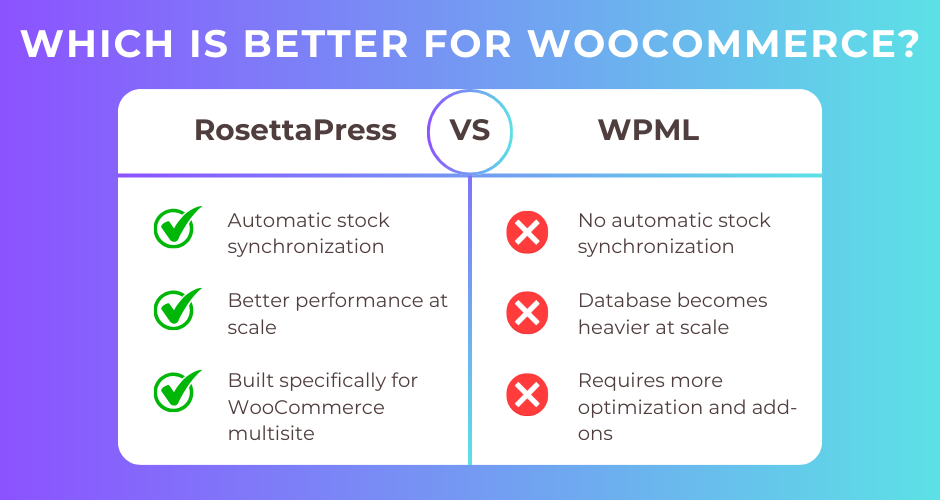
RosettaPress is a multisite-based translation solution designed exclusively for WordPress Multisite installations, offering complete language isolation with automated stock synchronization across sites. WPML is the industry-standard single-site multilingual plugin with comprehensive WooCommerce support through its WooCommerce Multilingual addon, powering over 1.5 million active websites worldwide.
This article provides an in-depth comparison of both solutions specifically for large-scale e-commerce operations. You’ll discover how each handles product translation at scale, which architecture performs better with extensive catalogs, and which solution best fits your technical infrastructure and business needs.
Quick Comparison Summary
| Feature | RosettaPress | WPML |
|---|---|---|
| Best For | Enterprise stores needing complete language isolation and native stock sync | Established stores wanting proven solution with professional translation workflows |
| Pricing | $199/year (5 multisites) | $199/year (unlimited sites) |
| Architecture | Multisite (one site per language) | Single-site (all languages in one database) |
| Performance at Scale | Optimal per-site performance with isolated databases | Requires caching strategy for large catalogs |
| Key Strength | Automatic stock synchronization across language sites | Translation memory and professional translation services |
| Key Weakness | Requires multisite infrastructure expertise | Database grows significantly with multiple languages |
RosettaPress Overview
RosettaPress is a WordPress multilingual plugin built exclusively for WordPress Multisite environments. Unlike traditional translation plugins that store all languages in a single database, RosettaPress treats each language as a completely separate WordPress installation with its own database tables, content, and configuration.
The plugin’s architecture follows a network-based approach where content relationships are managed through a central translation table. When you create or update a product on your primary site, RosettaPress can automatically clone it to all secondary language sites, apply machine translation via DeepL or Google Translate, and maintain synchronization of critical fields like stock quantities.
RosettaPress was designed with WooCommerce in mind from the ground up. The plugin offers comprehensive e-commerce features including product variation translation, attribute synchronization, product gallery management, and most notably, automatic stock synchronization across all language sites. This ensures inventory consistency without manual intervention.
For large WooCommerce stores operating at enterprise scale, RosettaPress provides a unique advantage: complete data isolation. Each language site operates independently with its own optimized database, meaning performance doesn’t degrade as you add languages. A customer browsing your German site queries only the German database, not a shared database containing content for all 10+ languages.
The plugin integrates deeply with Advanced Custom Fields, Elementor, and WP All Import, making it suitable for stores with complex product configurations. A network orders dashboard provides unified visibility across all language sites, giving you centralized order management while maintaining the benefits of distributed architecture.
RosettaPress Pros
- Complete language isolation: Each language operates as a separate WordPress installation with its own database, eliminating performance bottlenecks
- Automatic stock synchronization: Inventory updates propagate automatically across all language sites without manual intervention
- Optimal database performance: Query complexity doesn’t increase with additional languages since each site maintains its own tables
- Native WooCommerce focus: Built specifically for multisite e-commerce with product variation cloning, attribute translation, and cross-sell/upsell ID mapping
- Flexible per-language customization: Each site can have unique themes, plugins, payment gateways, and shipping configurations
- Comprehensive ACF integration: Supports all Advanced Custom Fields types including repeaters and flexible content
- Machine translation built-in: DeepL and Google Translate integration with translation caching to reduce API costs
- Site cloning capabilities: Quickly duplicate entire language sites for testing or launching new markets
RosettaPress Cons
- Multisite requirement: Requires WordPress Multisite infrastructure, which adds hosting complexity and may not be available on all hosting plans
- Limited translation workflow: No built-in review/approval process or translation management for teams
- Annual subscription costs: While competitive at $199/year for 5 multisites, ongoing costs are required for updates and support
- Steeper learning curve: Managing multisite networks requires more technical expertise than single-site installations
WPML Overview
WPML (WordPress Multilingual Plugin) has been the dominant force in WordPress translation since 2007. As a single-site solution, WPML stores all language versions within one WordPress installation using a sophisticated translation group system that links original content to its translations.
The plugin follows a modular architecture where the core plugin handles basic multilingual functionality, with additional components like String Translation, Translation Management, and WooCommerce Multilingual installed as needed. This approach allows you to enable only the features your store requires.
WPML’s WooCommerce integration comes through the WooCommerce Multilingual (WCML) addon, included in CMS and Agency plans. The addon provides comprehensive e-commerce translation covering all product types, variations, attributes, cart pages, checkout flows, and transactional emails. Support for 200+ currencies with automatic exchange rates makes WPML particularly strong for global stores requiring market-specific pricing.
The plugin’s real strength lies in its translation ecosystem. WPML offers multiple translation methods: manual translation via the Advanced Translation Editor, AI-powered automatic translation through its Private Translation Cloud, or professional human translation services. Translation memory ensures consistency across your catalog, while glossaries maintain terminology accuracy for technical products.
With over 1.5 million active installations, WPML has proven scalability across diverse industries. The plugin integrates seamlessly with all major page builders (Elementor, Divi, WPBakery), SEO plugins (Yoast, Rank Math), and WooCommerce extensions. Its extensive PHP API with 100+ hooks provides exceptional flexibility for custom requirements.
For large WooCommerce stores, WPML provides enterprise-grade features like translation workflow management, team collaboration tools, translator role assignment, and batch translation processing. The Advanced Translation Editor offers side-by-side translation with HTML protection and front-end preview before publishing.
WPML Pros
- Proven at scale: Powers 1.5+ million websites with demonstrated reliability for large catalogs
- Comprehensive translation workflow: Advanced Translation Editor, translation memory, glossaries, and professional translation service integration
- Extensive multicurrency support: 200+ currencies with automatic exchange rates and per-product custom pricing
- Rich plugin ecosystem: Dedicated compatibility addons for ACF, Gravity Forms, Contact Form 7, and major page builders
- Professional translation services: Direct integration with human translation agencies for quality assurance
- Single-site simplicity: No multisite infrastructure required, works on standard WordPress hosting
- Strong SEO features: Automatic hreflang tags, translated slugs, and deep integration with Yoast SEO and Rank Math
- Translation credits included: CMS plan includes 90,000 AI translation credits (Agency plan: 180,000)
WPML Cons
- Database complexity at scale: All language content stored in one database, potentially impacting query performance with large catalogs
- Performance requires optimization: Large multilingual WooCommerce stores need caching strategies to maintain speed
- Annual subscription required: No free tier; updates and support cease without active subscription
- Modular complexity: Multiple plugins (core + addons) can increase troubleshooting difficulty
Head-to-Head Comparison
Architecture & Scalability
RosettaPress and WPML take fundamentally different approaches to multilingual architecture, and this distinction becomes critical when managing 500+ products across 10+ languages.
RosettaPress operates on a multisite architecture where each language exists as a completely separate WordPress installation. Your German site has its own wp_posts, wp_postmeta, and wp_woocommerce_order_items tables with its own unique prefix. When a German customer browses products, WordPress queries only the German database tables. This architecture provides exceptional scalability because database query complexity remains constant regardless of how many languages you support.
In practice, this means a product query on your 10-language RosettaPress store executes at the same speed as a single-language store. Each site maintains approximately the same database size, making backups faster and troubleshooting simpler.
WPML stores all language content in a single shared database. Your 500 products in 10 languages result in 5,000 post records in the wp_posts table, plus corresponding meta entries for each variation, attribute, and custom field. WPML uses language filtering to retrieve only content for the active language, but the underlying queries become more complex as your multilingual catalog grows.
WPML compensates with optimized queries and caching strategies. The plugin works seamlessly with Redis object caching, page caching plugins like WP Rocket, and CDN services. With proper optimization, WPML handles large catalogs effectively, as evidenced by its widespread use on major e-commerce sites.
The architectural difference also affects customization flexibility. RosettaPress allows you to activate different plugins per language site. Your German store might use a local shipping plugin unavailable in other markets, while your French site uses a region-specific payment gateway. WPML requires all plugins to be activated globally, though you can conditionally display functionality based on language.
Winner: RosettaPress – The multisite architecture provides superior scalability for very large catalogs and eliminates database performance concerns as you add languages.
WooCommerce Features & Stock Management
Both plugins offer comprehensive WooCommerce support, but they differ significantly in how they handle inventory synchronization and product relationships.
RosettaPress includes native automatic stock synchronization as a core feature. When a product sells on your German site, the stock quantity automatically updates across all language sites within seconds. This synchronization works bidirectionally and requires no configuration beyond enabling the feature. The plugin also synchronizes product galleries, cross-sell/upsell relationships (automatically mapping product IDs across sites), and product attributes.
Product variation translation happens automatically when you clone a variable product. The plugin creates all variations on the target site, translates variation attributes, and maintains parent-child relationships. Custom product fields configured in your settings synchronize across translations, making it ideal for stores with complex product data structures.
The network orders dashboard provides a unified view of orders from all language sites, giving you centralized analytics while maintaining the benefits of separate databases. You can filter by site, date range, and status to understand performance across markets.
WPML’s WooCommerce Multilingual addon provides equally comprehensive product translation, covering all product types (simple, variable, grouped, external), variations, attributes, categories, and tags. The plugin offers a distinct advantage in multicurrency support, with 200+ currencies, automatic exchange rate updates (hourly/daily/weekly), and per-product custom pricing in different currencies.
However, WPML doesn’t include automatic stock synchronization. Stock quantities are managed per language, which can lead to overselling if you don’t manually synchronize inventory or use third-party inventory management systems. For stores with centralized warehousing serving all markets, this limitation requires workarounds.
WPML excels at content translation quality. The WooCommerce integration allows you to translate product descriptions, short descriptions, and attribute values using translation memory to maintain consistency. The Advanced Translation Editor protects HTML markup in product descriptions, preventing broken formatting.
Both plugins handle product duplication well. WPML can duplicate products to create initial translations, while RosettaPress automatically clones products from the primary site. For 500+ product catalogs, RosettaPress’s automatic cloning is particularly valuable when launching a new language.
Winner: RosettaPress – The automatic stock synchronization is a game-changer for large stores with centralized inventory, eliminating a major operational complexity.
Translation Workflow & Quality
This category reveals where WPML’s maturity and translation focus provide significant advantages.
WPML offers a comprehensive translation workflow designed for professional teams. The Translation Dashboard provides centralized management where you select content for translation, choose translation methods (automatic, manual, or professional service), and track status. You can assign translation jobs to team members with the Translator role, manage review processes, and receive notifications when translations are ready.
The Advanced Translation Editor is WPML’s flagship feature for manual translation. It displays the original and translation side-by-side, automatically protects HTML markup from accidental modification, and provides front-end preview before publishing. Translation memory suggests previously translated phrases, ensuring consistency across your 500+ product catalog. Glossaries enforce terminology standards, critical for technical products with specific nomenclature.
WPML’s automatic translation uses its Private Translation Cloud (PTC), which combines Google Translate, DeepL, and Microsoft Azure with proprietary AI algorithms. The system provides context-aware translations that maintain tone and branding consistency. CMS plans include 90,000 translation credits, while Agency plans include 180,000 credits. WPML offers a quality guarantee with full refunds for up to 500,000 words within 60 days if you’re unsatisfied.
Professional translation service integration sets WPML apart for quality-focused stores. You can send content directly to human translation agencies from the Translation Dashboard, receive quotes, and have translations automatically imported when complete. For high-value products or legally sensitive content, this human translation option provides peace of mind.
RosettaPress takes a simpler, automation-focused approach. The plugin integrates with DeepL and Google Translate for automatic translation, with translation caching to reduce API costs. It handles Gutenberg blocks, Elementor widgets, and ACF fields well, extracting translatable strings while preserving structure.
However, RosettaPress lacks translation workflow management. There’s no review/approval process, no team collaboration features, and no translation memory beyond API caching. The plugin focuses on getting content translated and synchronized quickly rather than managing translation quality processes.
For manual translation, RosettaPress provides a basic admin interface on post edit screens showing translation links and allowing you to link existing content. You translate directly in the WordPress editor on each language site rather than through a specialized translation interface. This approach works but lacks the efficiency and safety features of WPML’s editors.
The translation philosophies differ fundamentally. WPML is designed for professional translation workflows with quality controls. RosettaPress prioritizes automation and synchronization, making it ideal for stores willing to rely primarily on machine translation with manual editing as needed.
Winner: WPML – The comprehensive translation workflow, Advanced Translation Editor, translation memory, and professional service integration provide superior quality control for large catalogs.
Performance at Scale
Performance characteristics differ significantly due to architectural approaches, and these differences become pronounced with large product catalogs.
RosettaPress delivers consistent performance regardless of language count. Each language site queries its own database with simple, fast queries. A product listing page on your German site executes the same query whether you support 2 languages or 20 languages. Database table sizes remain manageable since they only contain one language’s content.
This architecture also provides predictable performance scaling. Adding your 11th language doesn’t slow down your existing 10 languages. Each site can be optimized independently, and you can even distribute language sites across different servers if needed (though this requires advanced configuration).
Page caching works straightforwardly with RosettaPress since each language site is truly separate. Standard WordPress caching plugins work without special configuration. The only performance consideration is cross-site operations like stock synchronization, which RosettaPress handles efficiently through batch processing.
WPML’s performance depends heavily on implementation quality. On an unoptimized setup, a large multilingual WooCommerce catalog can experience slower query times as WPML filters results by language from large shared tables. Category pages, search results, and related products queries all require language filtering.
However, WPML is compatible with all major optimization solutions. Redis object caching dramatically improves performance by caching language-filtered query results. Page caching plugins like WP Rocket, LiteSpeed Cache, and W3 Total Cache all work with WPML, with JavaScript-based language detection ensuring proper redirection for cached pages.
With proper optimization, WPML performs well even on large stores. The plugin has been tested extensively on high-traffic sites and includes optimized database queries with proper indexing. The modular architecture allows you to disable unneeded components, reducing overhead.
Database size becomes a consideration with WPML. A 500-product store in 10 languages generates 5,000+ post records plus corresponding metadata. Database backups take longer, and restoration for testing becomes more cumbersome. Complex product queries involving custom fields, variations, and attributes can stress the database without proper indexing and caching.
For very large catalogs (1,000+ products across 10+ languages), RosettaPress’s isolated databases provide a performance advantage that’s difficult to match through optimization alone. The architectural efficiency compounds as scale increases.
Winner: RosettaPress – The multisite architecture provides inherently better performance at scale, with consistent query speeds regardless of language count.
Multi-Currency & Market Customization
Currency handling and market-specific customization separate these solutions for global e-commerce operations.
WPML’s WooCommerce Multilingual addon includes exceptional multicurrency support. You can configure 200+ currencies with automatic exchange rate updates from external sources (hourly, daily, or weekly intervals). Manual exchange rate configuration allows you to add markups or use custom rates for specific markets.
The real power lies in per-product custom pricing. You might price a product at $99 USD, but instead of auto-converting to euros, you set a strategic €89 EUR price point. This market-specific pricing extends to sale prices, allowing region-appropriate promotions.
Currency-specific payment gateway configuration means you can restrict certain payment methods to specific currencies. Your European customers see PayPal and SEPA, while Asian markets see Alipay and WeChat Pay. Shipping rate configuration works similarly, with different shipping methods and costs per currency.
WPML includes currency switcher widgets and shortcodes, allowing customers to switch currencies independently of language (useful for international customers who prefer their home currency). Currency selection persists across sessions, and orders are processed in the selected currency.
RosettaPress handles currency differently due to its multisite architecture. Each language site is a completely separate WooCommerce installation, meaning you configure currency settings independently per site using native WooCommerce settings. Your German site uses EUR, your US site uses USD, and your UK site uses GBP.
This approach provides ultimate flexibility. Each site can have entirely different payment gateways, shipping methods, tax configurations, and WooCommerce settings. Your German site might use German-specific shipping plugins and payment processors that don’t need to be active on other sites. You can install different WooCommerce extensions per market.
However, RosettaPress doesn’t include currency switching functionality. A customer on your German site sees prices in EUR only. If they want USD pricing, they need to visit the English/US site. This limitation is generally acceptable since customers typically prefer their local currency anyway.
For market customization beyond currency, RosettaPress has a clear advantage. Each site can have different themes, unique promotional banners, region-specific product recommendations, and localized checkout flows. WPML requires all customizations to be language-conditional within a single installation.
Winner: WPML – The comprehensive multicurrency features with per-product pricing and currency switching provide superior flexibility for global pricing strategies.
Database Management & Maintenance
Managing databases for large multilingual stores involves different challenges depending on architecture.
RosettaPress distributes data across multiple databases (technically, the same database with different table prefixes per site). A 5-language store has 5 sets of WordPress/WooCommerce tables. This distribution provides several advantages for maintenance:
Backups are more granular. You can backup individual language sites, making restoration faster if you need to rollback changes on one market. Testing becomes safer since you can clone a single language site to staging without duplicating your entire multilingual setup.
Database queries are simpler and faster. When reviewing order data, you query a single site’s tables rather than filtering a shared database. This simplicity extends to troubleshooting, custom reporting, and data exports.
However, multisite databases require more sophisticated management. Updates to core WordPress, WooCommerce, or plugins need to propagate across the network. You need to be mindful of network-wide tables versus site-specific tables. Database migrations and hosting changes require multisite expertise.
Storage requirements multiply by language count. A 500-product catalog that occupies 200MB in a single database occupies approximately 2GB across 10 RosettaPress language sites (accounting for shared network tables). For stores with extensive order history and customer data, this multiplication matters.
WPML consolidates all language data in one database. A 500-product, 10-language store has 5,000 post records plus metadata in shared tables. This approach has advantages:
Backups are simpler and smaller. One backup captures your entire multilingual store. Restoration is straightforward, and most hosting backup solutions work without special configuration.
Centralized data enables easier reporting across languages. You can query all orders from all languages in a single database query (though you still need to account for language filters). Third-party analytics and reporting tools work without modification.
The downside is database complexity. Tables grow large quickly, and complex queries involving joins across posts, postmeta, and WPML’s translation tables can strain performance without proper indexing. Database optimization becomes critical as scale increases.
WPML requires diligent index management and regular optimization. Large wp_postmeta and wp_icl_translations tables need periodic cleanup and optimization to maintain query speed. Database size can exceed several gigabytes even with moderate catalogs.
For very large stores, RosettaPress’s distributed architecture simplifies database management by keeping each language database at a manageable size. For stores prioritizing simplicity and unified data access, WPML’s single-database approach is easier to manage.
Winner: Tie – RosettaPress offers better performance and granular control; WPML offers simpler management and unified access. The ideal choice depends on your technical capabilities and priorities.
SEO & International Targeting
Both plugins provide comprehensive SEO features, with slight differences in implementation and capabilities.
WPML offers multiple URL structure options: directory-based (/de/, /es/), subdomain-based (de.domain.com), separate domains per language (domain.de), or URL parameters (?lang=de). Directory-based URLs are recommended and require non-default permalink structures. Subdomain and separate domain approaches provide stronger regional SEO signals.
Automatic hreflang tag generation is built-in, telling search engines about language relationships between pages. WPML integrates deeply with Yoast SEO and Rank Math through dedicated addons, allowing you to translate SEO titles, meta descriptions, focus keywords, and Open Graph tags within the translation workflow.
Translated URL slugs improve SEO for non-English markets. Your “blue-running-shoes” product can have a “/blaue-laufschuhe/” slug in German. XML sitemaps are automatically segmented by language, and canonical URL handling prevents duplicate content issues.
RosettaPress leverages multisite’s native URL structure, typically using subdomains (de.domain.com) or subdirectories (/de/) configured at the network level. The separate domain option allows completely different domains per market (domain.de, domain.co.uk), providing the strongest regional SEO signals.
Each language site is a truly separate WordPress installation, meaning standard SEO plugins like Yoast SEO or Rank Math work without special configuration. You configure SEO settings independently per site, allowing market-specific strategies. Your German site might target different keywords and use different SEO tactics than your English site.
hreflang tags are automatically generated by RosettaPress, linking translated content across sites. Each site can have its own XML sitemap configuration, useful for large catalogs where you want different sitemap structures per market.
The multisite architecture provides SEO advantages for regional targeting. Each language site can have unique hosting (potentially in different geographic regions), separate SSL certificates, and independent domain authority building. This separation is valuable for enterprise SEO strategies.
Both solutions handle canonical URLs properly, avoiding duplicate content penalties. Both support RTL languages fully for Arabic, Hebrew, and other right-to-left markets.
The main difference is flexibility. WPML keeps everything in one WordPress installation, which simplifies management but requires language-conditional SEO logic. RosettaPress separates everything, providing maximum flexibility but requiring more setup and network-level configuration.
Winner: Tie – WPML offers simpler setup with excellent SEO plugin integration; RosettaPress provides superior regional targeting options through true site separation.
RosettaPress vs WPML: Which Should You Choose?
Choosing between RosettaPress and WPML for your large WooCommerce store ultimately depends on your technical infrastructure, operational priorities, and growth trajectory.
Choose RosettaPress if:
- You need automatic stock synchronization – This feature alone can justify RosettaPress for stores with centralized inventory serving multiple language markets. Eliminating manual inventory synchronization reduces operational overhead and prevents overselling.
- Your store has 500+ products across 10+ languages – The multisite architecture provides superior performance at this scale, with database query speeds that don’t degrade as you add languages or products.
- You have multisite infrastructure expertise – Your team understands WordPress Multisite, is comfortable with network-level configuration, and can manage the additional complexity that multisite introduces.
- You want complete language isolation – Each market needs unique themes, different plugins, separate payment gateways, or region-specific functionality that would be complicated to manage conditionally in a single-site setup.
- Database performance is critical – You’re experiencing or anticipating database performance bottlenecks with a single-site solution, and you want the inherent scalability of distributed databases.
- You rely primarily on machine translation – Your workflow emphasizes automated translation via DeepL or Google Translate with manual editing as needed, rather than professional translation workflows.
Choose WPML if:
- You require comprehensive translation workflow management – Your operation involves professional translators, review processes, translation memory, and quality controls that WPML’s Advanced Translation Editor and Translation Management provide.
- Multicurrency with per-product pricing is essential – You need sophisticated currency features including market-specific pricing strategies, currency switching, and automatic exchange rates.
- You want proven stability and extensive support – WPML’s 1.5+ million installations and 18-year track record provide confidence for mission-critical e-commerce operations. The extensive plugin compatibility and 6-day/week support reduce risk.
- Multisite infrastructure isn’t available – Your hosting doesn’t support WordPress Multisite, or your team lacks multisite expertise and you need a single-site solution.
- You need professional translation services – Human translation quality is critical for your products, and you want direct integration with professional translation agencies.
- You have complex plugin dependencies – Your store relies on plugins that may not work properly in a multisite environment, or you need WPML’s extensive compatibility addons for plugins like ACF, Gravity Forms, or specialized WooCommerce extensions.
- Unified data access simplifies operations – You prefer managing all language data in one database for reporting, backup simplicity, and centralized analytics.
Alternative consideration: If both plugins have limitations for your specific needs, consider MultilingualPress, which offers multisite-based translation like RosettaPress but with more mature translation workflow features, though it lacks RosettaPress’s automatic stock synchronization.
Frequently Asked Questions
Can I migrate from WPML to RosettaPress or vice versa?
Migration between these plugins is technically possible but complex due to their architectural differences. Migrating from WPML (single-site) to RosettaPress (multisite) requires converting your WordPress installation to multisite, creating separate sites for each language, and mapping translated content across sites. This process typically requires developer expertise and careful planning.
The reverse migration from RosettaPress to WPML involves consolidating separate language sites into one WordPress installation, which is equally complex. For large stores with 500+ products, professional migration services are strongly recommended. Budget several weeks for testing before attempting a production migration. Many stores find it more practical to stick with their initial choice rather than migrate mid-operation.
How do stock synchronization differences affect daily operations?
With RosettaPress, stock updates are automatic and bidirectional. When a product sells on any language site, inventory updates across all sites within seconds. This synchronization requires no manual intervention and prevents overselling scenarios. The system handles even complex variable products with multiple variations.
WPML doesn’t include automatic stock synchronization. You manage stock quantities per language, which works if you conceptually treat each language as a separate inventory pool. For stores with centralized warehousing, you need to either manually keep stock synchronized or implement third-party inventory management systems that work across WPML languages. Some stores use WooCommerce’s native inventory management features with custom development to bridge this gap.
Do I need WordPress Multisite expertise to use RosettaPress?
Yes, RosettaPress requires solid WordPress Multisite knowledge. You need to understand network activation versus site activation, network-wide settings versus per-site settings, multisite database structure, and subdomain/subdirectory configuration. User management becomes more complex as you decide which users have access to which sites in the network.
If your team lacks multisite experience, the learning curve is significant. Multisite introduces hosting considerations (some shared hosting plans don’t support it), complicates plugin/theme updates, and requires different backup and migration approaches. However, once mastered, multisite provides powerful capabilities beyond just multilingual functionality. Many agencies prefer multisite expertise in their teams specifically because it enables advanced WordPress architectures.
Which plugin is better for SEO and international targeting?
Both plugins provide excellent SEO capabilities, but they approach international targeting differently. WPML works within a single site, offering directory-based (/de/), subdomain (de.domain.com), or separate domain URLs. It integrates tightly with Yoast SEO and Rank Math through dedicated addons, making SEO metadata translation seamless.
RosettaPress leverages multisite’s native structure, typically using subdomains or subdirectories. The key SEO advantage is true site separation – each language can have completely independent SEO strategies, different hosting locations for regional performance, and separate domain authority building. For enterprise SEO where you’re building regional brands (like domain.de for Germany, domain.fr for France), RosettaPress’s architecture provides more flexibility.
For most stores, both solutions deliver effective SEO. The deciding factor is whether you need the advanced regional targeting and independence that RosettaPress’s multisite architecture enables.
Can I use automatic translation with both plugins, and what are the costs?
Yes, both plugins support automatic machine translation, but with different approaches. WPML includes translation credits in CMS plans (90,000 credits) and Agency plans (180,000 credits). WPML’s Private Translation Cloud combines Google Translate, DeepL, and Microsoft Azure with proprietary AI for context-aware translations. Additional credits can be purchased as needed, and WPML offers a quality guarantee with refunds for unsatisfactory translations.
RosettaPress integrates directly with DeepL and Google Translate APIs, requiring you to provide your own API keys and pay those services directly based on their usage-based pricing. DeepL charges approximately €20 per million characters, while Google Translate charges around $20 per million characters. RosettaPress includes translation caching to reduce redundant API calls and minimize costs.
For a 500-product catalog in 10 languages, initial translation costs would be similar with either solution. WPML’s included credits provide value for CMS/Agency plan subscribers, while RosettaPress’s direct API approach offers transparency and control over translation costs long-term.
Final Thoughts
For large WooCommerce stores managing 500+ products across 10+ languages, both RosettaPress and WPML offer robust multilingual solutions, but they excel in different operational contexts.
RosettaPress stands out for stores prioritizing performance, complete language isolation, and automated operations. The automatic stock synchronization eliminates a significant operational burden, while the multisite architecture ensures consistent performance as your catalog and language count grow. If you have the technical capability to manage WordPress Multisite and value database performance at scale, RosettaPress provides a solid foundation for enterprise e-commerce.
WPML remains the safer choice for stores requiring proven stability, comprehensive translation workflows, and sophisticated multicurrency features. Its 18-year track record, extensive plugin compatibility, and professional translation service integration make it ideal for organizations where translation quality and established workflows are paramount. The single-site architecture simplifies management if multisite expertise isn’t available in your team.
The decision fundamentally comes down to your technical infrastructure and operational priorities. Stores with existing multisite setups and centralized inventory management will find RosettaPress’s architecture and stock synchronization compelling. Stores wanting maximum compatibility, mature translation tools, and human translation options should choose WPML’s comprehensive ecosystem.
Ready to build your multilingual store? Both solutions offer annual subscriptions at competitive price points ($199/year for comparable plans). Consider starting with a proof-of-concept deployment to test performance with your specific hosting environment, product catalog complexity, and team workflow before committing to either solution.
For more WooCommerce multilingual guidance, explore our comparison of TranslatePress vs WPML for e-commerce and our guide to optimizing multilingual WooCommerce performance.