

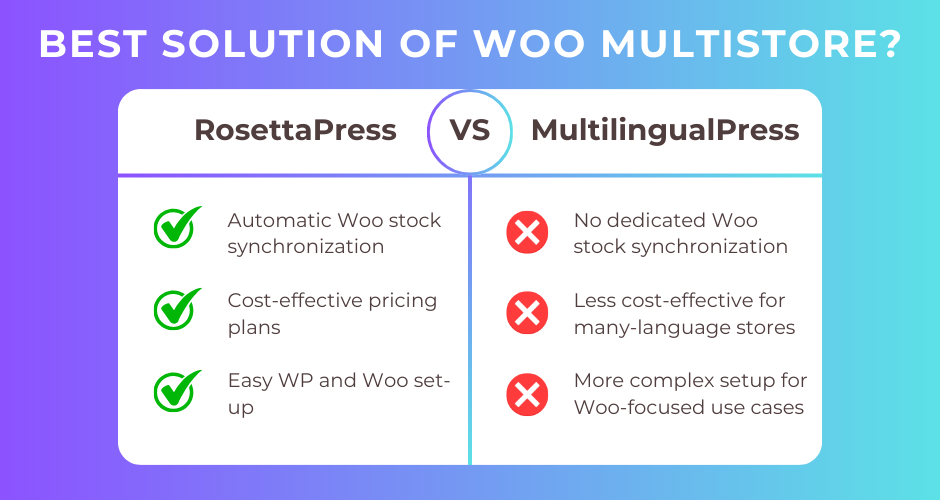
Both plugins leverage WordPress Multisite to create separate sites for each language, ensuring complete data isolation and optimal performance. However, they differ significantly in their approach to WooCommerce integration, automatic translation, and content management workflows.
This comprehensive comparison examines both plugins across seven key criteria, helping you determine which solution best fits your multilingual e-commerce needs. Whether you prioritize WooCommerce-specific features like stock synchronization or prefer a more general-purpose multisite translation tool, this guide provides the clarity you need.
Quick Comparison Summary
| Feature | RosettaPress | MultilingualPress |
|---|---|---|
| Best For | WooCommerce multisite stores needing stock sync and automatic cloning | General multisite projects requiring clean architecture and flexibility |
| Pricing | $99-$299/year (site-based) | $149-$1,499/year (language-based) |
| Ease of Use | Excellent for WooCommerce-focused workflows | Good for experienced multisite administrators |
| Key Strength | Comprehensive WooCommerce integration with automatic stock synchronization | Official endorsements from WooCommerce and Yoast SEO |
| Key Weakness | Newer plugin with smaller user base | Higher starting price with language-based limitations |
RosettaPress Overview
RosettaPress is a WordPress multilingual plugin designed exclusively for WordPress Multisite installations, with a strong emphasis on WooCommerce functionality. Developed by WPify, it treats each site in your network as a separate language version while maintaining translation relationships through a central translation table.
What sets RosettaPress apart is its WooCommerce-first approach. The plugin provides automatic stock synchronization across all language sites, ensuring inventory consistency without manual intervention. When you sell a product on your English site, the stock level automatically updates on your German, French, and Spanish sites.
Beyond WooCommerce, RosettaPress offers automatic content cloning from a designated primary site, machine translation via DeepL and Google Translate, and comprehensive support for Advanced Custom Fields (ACF) and Elementor. The plugin follows a modern PHP 8.1+ architecture with dependency injection and feature-based code organization.
RosettaPress targets agencies and e-commerce businesses running WooCommerce stores across multiple languages where inventory accuracy and efficient content management are priorities.
RosettaPress Pros
- Automatic WooCommerce stock synchronization across all language sites prevents overselling
- Comprehensive product translation including variations, attributes, galleries, cross-sells, and upsells
- Built-in automatic translation via DeepL and Google Translate with caching
- Automatic content cloning from primary site speeds up content deployment
- Network orders dashboard provides unified view of sales across all languages
- Site cloning feature rapidly sets up new language sites with database duplication
- Extensive REST API and WP-CLI support for automation
- All features included without add-on purchases
RosettaPress Cons
- WordPress Multisite required (cannot be used on single-site installations)
- Smaller user base compared to established alternatives
- No built-in translation workflow or approval process for editorial teams
MultilingualPress Overview
MultilingualPress is an established WordPress multilingual plugin that has been serving the multisite community since 2011. Developed by Syde GmbH (formerly Inpsyde GmbH), it uses WordPress Multisite architecture to create independent sites for each language, ensuring complete data separation and native WordPress functionality per language.
The plugin has achieved over 300,000 downloads and holds official endorsements from both WooCommerce (recommended in their documentation) and Yoast SEO, which describes it as “the only sane way to run a multilingual site on WordPress.” This recognition reflects the plugin’s clean architectural approach and enterprise-grade reliability.
MultilingualPress emphasizes data ownership and flexibility. All translations remain stored locally in the WordPress database, preventing vendor lock-in. The plugin supports 200+ languages and offers modular activation of features including WooCommerce support, page builder integrations, and automatic translation via DeepL, OpenAI, Amazon Translate, or Google Translate.
The plugin targets enterprise websites, agencies, and organizations requiring complete SEO control, extensive customization capabilities, and the flexibility to manage diverse multilingual projects beyond just e-commerce.
MultilingualPress Pros
- Official endorsements from WooCommerce and Yoast SEO validate enterprise readiness
- Zero vendor lock-in as all data remains in local WordPress database
- Flexible URL structures supporting subdomains, subdirectories, and domain mapping
- Multiple automatic translation providers (DeepL, OpenAI, Amazon, Google)
- Modular architecture allows enabling only needed features
- 14-year track record with over 300,000 downloads
- Comprehensive hreflang generation for SEO
MultilingualPress Cons
- Higher starting price at $149/year with language-based tier limitations
- No dedicated WooCommerce stock synchronization feature
- More complex initial setup compared to WooCommerce-focused alternatives
Head-to-Head Comparison
WooCommerce Integration
RosettaPress delivers comprehensive WooCommerce integration purpose-built for multilingual e-commerce. The standout feature is automatic stock synchronization: when inventory changes on any language site, RosettaPress updates stock levels across all connected sites in real-time. This prevents the common e-commerce problem of overselling products when managing inventory across multiple language stores.
Product translation in RosettaPress includes complete support for variable products with automatic variation cloning, product attribute translation, gallery synchronization, and intelligent mapping of cross-sell and upsell product IDs to their translated equivalents. The network orders dashboard provides a unified view of sales across all language sites from a single admin screen.
MultilingualPress offers solid WooCommerce compatibility with product translation, category translation, order translation, and coupon translation. However, it lacks the automatic stock synchronization that e-commerce stores require. Each language site operates as a completely separate WooCommerce installation, which provides flexibility but requires manual inventory management or custom development for stock synchronization.
During product creation, RosettaPress automatically clones products from the primary site to all language sites (when enabled), then applies automatic translation. MultilingualPress requires manually creating products on each site or using the site cloning feature, which is less streamlined for ongoing product additions.
Winner: RosettaPress – The automatic stock synchronization and WooCommerce-specific automation features make it the superior choice for multilingual e-commerce stores.
Automatic Translation
RosettaPress integrates DeepL and Google Translate for automatic machine translation with intelligent caching that reduces API costs. The plugin translates post content, post meta, taxonomy terms, and term meta, with special handling for Gutenberg blocks and Elementor widgets. Translation caching stores previously translated content to file, preventing redundant API calls when similar content appears.
Configuration is straightforward: select your translation provider, enter your API key, and enable automatic translation for specific post types. The plugin can automatically translate content during the cloning process or via bulk translation through the REST API. Already-translated content can be skipped to avoid unnecessary processing.
MultilingualPress offers more translation provider options including DeepL, OpenAI, Amazon Translate, and Google Translate through its AutoTranslate feature introduced in version 5.0.0. Translation processing occurs via WordPress Cron in the background, maintaining site performance. The plugin can automatically translate WordPress core blocks, taxonomies, and comments.
While MultilingualPress provides more provider choices, RosettaPress integrates automatic translation more tightly into the content cloning workflow. For WooCommerce stores, the ability to clone a product and automatically translate it in one streamlined operation provides significant time savings.
Winner: RosettaPress – The integrated workflow combining cloning and automatic translation is more efficient for e-commerce content management, though MultilingualPress offers more provider flexibility.
Content Cloning and Setup Speed
RosettaPress excels at rapid content deployment through its automatic cloning system. Designate one site as the primary language, and RosettaPress can automatically clone posts, pages, products, and custom post types to all secondary language sites. The cloning process preserves post relationships, featured images, taxonomies, and custom fields.
For WooCommerce products, automatic cloning includes product variations, galleries, attributes, and relationships. The site cloning feature duplicates entire sites including database tables, with configurable table exclusion and search-and-replace functionality for domain updates. This dramatically reduces setup time when launching new language markets.
MultilingualPress provides site duplication with content copying and media library synchronization. The site cloning feature creates a complete copy of a site with all content, which is useful for initial setup. However, it lacks the ongoing automatic cloning that RosettaPress provides for new content added to the primary site.
For ongoing content management, RosettaPress requires less manual intervention. Publish a new product on your primary site, and it automatically appears (translated) on all language sites. MultilingualPress requires creating content on each site individually or using manual duplication.
Winner: RosettaPress – Automatic cloning from a primary site significantly accelerates content management for stores publishing products regularly.
Developer Features and Extensibility
RosettaPress provides extensive developer capabilities through a comprehensive REST API under the rosettapress/v1 namespace covering posts translation, terms translation, WooCommerce operations, site management, and automatic translation. WP-CLI support includes commands for site cloning and management.
The plugin offers numerous PHP filters for customizing clone behavior, synchronization logic, and automatic translation processing. Developers can hook into actions like rosettapress_post_cloned and rosettapress_after_post_sync to extend functionality. The modern architecture uses dependency injection with a container accessible via the rosettapress() helper function.
MultilingualPress provides WP-CLI commands for site and content relationship management, with hooks and filters for customization. Documentation includes filters like multilingualpress.remote_post_search_arguments and multilingualpress.hreflang_post_status for query manipulation and SEO control.
Both plugins offer solid developer capabilities. RosettaPress has a more extensive REST API documented in the codebase, while MultilingualPress’s 14-year history means more community knowledge and third-party integration examples exist.
Winner: Tie – Both plugins provide excellent developer features, with RosettaPress offering a more comprehensive REST API and MultilingualPress benefiting from longer community support.
Performance and Scalability
Both RosettaPress and MultilingualPress leverage WordPress Multisite architecture, which provides inherent performance advantages for multilingual sites. Each language operates as a separate WordPress installation with its own database tables, preventing the database bloat common in single-site translation plugins that store all languages in one database.
RosettaPress optimizes performance through translation lookup caching, DeepL translation response caching, and efficient batch operations. The site cloning process handles large databases through pagination with 5,000-row chunks. Cross-site database queries are minimized through batch operations.
MultilingualPress processes automatic translations in the background via WordPress Cron, ensuring translation work doesn’t slow down page loads. The multisite architecture allows each language site to be independently optimized or even hosted on separate servers with domain mapping.
Frontend page load times are nearly identical between plugins because the multisite architecture means each page request only touches one site’s database tables. Neither plugin adds significant overhead to page rendering.
Winner: Tie – Both plugins deliver excellent performance through the multisite architecture, with minimal differences in page load impact.
Pricing and Value
RosettaPress uses site-based pricing across three tiers:
- Small: $99/year for 1 multisite installation
- Medium: $199/year for 5 multisite installations
- Agency: $299/year for unlimited multisite installations
All plans include all features with one year of support and updates. For agencies managing multiple client sites, the Agency plan offers excellent value. A single multisite installation can support unlimited language sites.
MultilingualPress uses language-based pricing:
- Starter: $149/year for 2 languages
- Professional: $499/year for 6 languages
- Advanced: $899/year for 12 languages
- Enterprise: $1,499/year for unlimited languages
All plans cover one WordPress multisite installation and include all features with one year of support and updates. For stores requiring many languages, costs escalate significantly.
Consider a WooCommerce store selling in 8 languages on a single multisite network:
- RosettaPress: $99/year (Small plan)
- MultilingualPress: $899/year (Advanced plan)
For agencies managing 10 client multisite installations:
- RosettaPress: $299/year (Agency plan)
- MultilingualPress: $1,490/year (10 × $149 Starter plan, assuming 2 languages per client)
Both plugins require separate costs for automatic translation API usage (DeepL, Google Translate, etc.).
Winner: RosettaPress – More cost-effective pricing structure for most scenarios, particularly for stores with many languages or agencies managing multiple client sites.
Support and Documentation
RosettaPress provides documentation through its official website, with support included in all license tiers for one year. The plugin is newer (released recently) but benefits from modern development practices with well-commented code and a clear architectural structure. Community support is growing but smaller than established alternatives.
MultilingualPress offers premium support in English and German with all plans. The plugin maintains comprehensive documentation at multilingualpress.org/docs/ covering getting started, feature modules, WooCommerce integration, and developer resources. With 14 years of history and over 300,000 downloads, extensive community knowledge exists through blog posts, tutorials, and forum discussions.
Both plugins provide professional support channels, though MultilingualPress’s longer track record means more troubleshooting resources exist online.
Winner: MultilingualPress – The extensive documentation, bilingual support, and 14-year knowledge base provide an advantage, though RosettaPress offers solid professional support.
RosettaPress vs MultilingualPress: Which Should You Choose?
Choose RosettaPress if:
- You’re running a WooCommerce store where inventory synchronization across language sites is essential
- Automatic content cloning from a primary site will significantly reduce your content management workload
- You need comprehensive product translation including variations, attributes, and cross-sell/upsell mapping
- You manage multiple client multisite installations and want an affordable agency license
- You’re launching a multilingual WooCommerce store in 5+ languages and want to minimize costs
- Quick deployment of translated content through integrated automatic translation matters to you
- You want a unified network orders dashboard showing sales across all language sites
Choose MultilingualPress if:
- You’re running a general-purpose multisite project without heavy WooCommerce requirements
- Official endorsements from WooCommerce and Yoast SEO are important for enterprise approval
- You need flexibility to choose from multiple automatic translation providers (DeepL, OpenAI, Amazon, Google)
- Data ownership without vendor lock-in is a priority for your organization
- You prefer a plugin with 14 years of history and extensive community resources
- Your project requires only 2-3 languages where MultilingualPress’s Starter plan ($149) is competitive
- You value modular feature architecture for customized multilingual implementations
If WooCommerce is not your primary use case and you’re building a content-focused multisite with only a few languages, MultilingualPress provides excellent architecture and proven reliability.
Frequently Asked Questions
Can I use either plugin on a single-site WordPress installation?
No. Both RosettaPress and MultilingualPress require WordPress Multisite architecture and cannot function on single-site WordPress installations. Each plugin leverages the multisite network where each language exists as a separate site. If you need multilingual functionality on a single-site installation, consider alternatives like WPML, Polylang, or TranslatePress.
How does automatic stock synchronization work in RosettaPress?
RosettaPress monitors stock quantity changes on WooCommerce products across all language sites in your network. When inventory changes on any site (whether through a sale, manual adjustment, or external system), RosettaPress automatically updates the stock level on all connected product translations. This ensures consistent inventory across all languages and prevents overselling. The synchronization can be configured per product type and excludes WP-CLI operations to prevent conflicts during bulk imports.
Do translation provider API costs differ between the plugins?
Both RosettaPress and MultilingualPress integrate with external translation providers (DeepL, Google Translate) whose APIs charge separately based on usage. Neither plugin includes translation costs in its licensing fees. RosettaPress supports DeepL and Google Translate, while MultilingualPress additionally supports OpenAI and Amazon Translate. Translation costs depend on your chosen provider’s pricing model, typically calculated per character or word translated.
Can I migrate from MultilingualPress to RosettaPress or vice versa?
Migration between plugins requires careful planning as both use different database structures for storing translation relationships. Since both plugins rely on WordPress Multisite with separate sites per language, your content remains intact on each site. However, translation relationships (which posts/products are linked across languages) would need reconfiguration. For existing multisite installations considering a switch, plan for manual translation relationship re-establishment or custom migration scripting.
Which plugin performs better for large WooCommerce catalogs?
Both plugins deliver similar performance for large catalogs because they leverage multisite architecture where each language site has its own isolated database tables. A product query on the German site only touches the German site’s database, preventing the bloat issues common in single-database multilingual solutions. RosettaPress may have a slight advantage during bulk operations due to its caching optimizations and batch translation processing through the REST API, but the difference is minimal for typical store sizes.
Final Thoughts
Both RosettaPress and MultilingualPress represent excellent solutions for WordPress Multisite multilingual implementations, with the optimal choice depending on your specific project requirements.
For WooCommerce-focused multisite stores, RosettaPress delivers purpose-built features that streamline e-commerce operations. The automatic stock synchronization alone can justify the investment by preventing inventory discrepancies and overselling scenarios. Combined with automatic content cloning, comprehensive product translation, and cost-effective pricing for multi-language stores, RosettaPress is the recommended choice for most multilingual WooCommerce projects.
MultilingualPress excels in scenarios requiring maximum flexibility, proven enterprise reliability, and official integrations with WordPress ecosystem leaders. Its longer track record, official endorsements, and modular architecture make it ideal for complex multisite implementations beyond pure e-commerce.
Evaluate your primary use case: if WooCommerce is central to your project, RosettaPress provides specialized tools that will save significant time and prevent inventory management headaches. If you’re building a diverse multisite network with varied content types where WooCommerce is just one component, MultilingualPress’s flexibility and established reputation offer compelling benefits.
Ready to launch your multilingual WooCommerce store?
- Try RosettaPress for WooCommerce-optimized multisite translation with automatic stock sync
- Explore MultilingualPress for enterprise-grade multisite translation with proven reliability
Related Articles:
- WPML vs Polylang: Complete Comparison for WordPress Sites
- Best WordPress Translation Plugins for WooCommerce (2025)
- WordPress Multisite for Multilingual Sites: Complete Setup Guide