

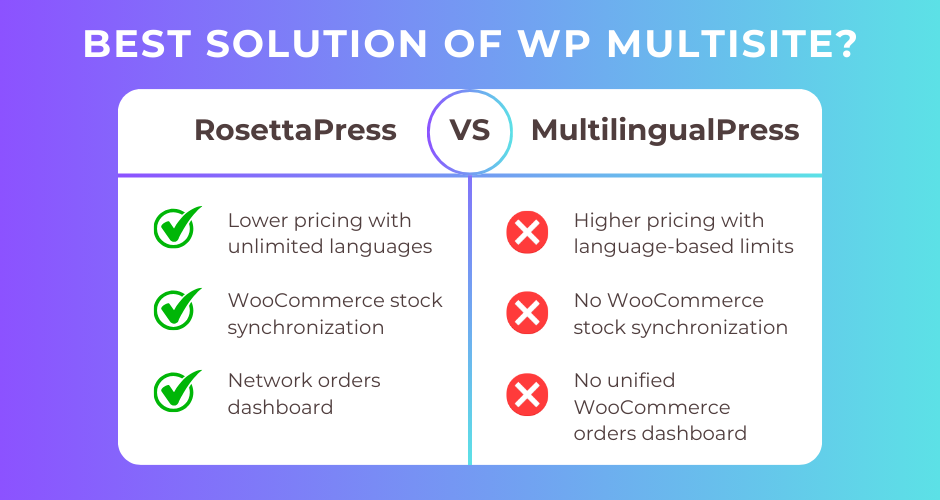
If you’re running a WordPress Multisite network and need to manage multilingual content, you face a critical decision: which translation plugin will best serve your needs?
RosettaPress and MultilingualPress are both premium WordPress plugins designed exclusively for Multisite installations. They share the same architectural approach—treating each language as a separate site within your network—but differ significantly in pricing, feature sets, and development flexibility. MultilingualPress has been around since 2011 with endorsements from WooCommerce and Yoast SEO, while RosettaPress is a modern alternative built with contemporary development practices and a comprehensive REST API.
This guide provides an in-depth comparison to help you choose between these two powerful multisite translation solutions. We’ll examine pricing, WooCommerce capabilities, automatic translation, developer features, and ease of use.
Quick Comparison Summary
| Feature | RosettaPress | MultilingualPress |
|---|---|---|
| Best For | Developers and agencies needing API access and stock sync | Established sites prioritizing official endorsements |
| Pricing | $99-299/year (unlimited languages) | $149-1,499/year (language limits per tier) |
| Ease of Use | Moderate (modern admin interface) | Moderate (translation metabox in editor) |
| Key Strength | REST API, WP-CLI, WooCommerce stock sync | Official WooCommerce/Yoast endorsements |
| Key Weakness | No translation workflow/approval | Higher cost, language-based pricing tiers |
RosettaPress Overview
RosettaPress is a modern WordPress multisite translation plugin that emphasizes developer flexibility and automation. Built with PHP 8.1+ and modern development practices, it provides comprehensive multilingual capabilities through a clean architecture and extensive API.
The plugin excels at automatic content cloning from a primary site to all language sites, supports machine translation via DeepL and Google Translate, and offers robust WooCommerce integration including inventory synchronization across all language stores. RosettaPress includes a full REST API for programmatic access and WP-CLI commands for site management automation.
Key differentiating features include WooCommerce stock synchronization, comprehensive ACF support for complex field structures, Elementor content translation, and a network orders dashboard for viewing all e-commerce orders across language sites. The plugin is designed for agencies and developers who need programmatic control and workflow automation.
RosettaPress Pros
- Significantly more affordable ($99-299/year vs $149-1,499/year)
- Full REST API for programmatic operations
- WP-CLI commands for site cloning and management
- WooCommerce stock synchronization across language sites
- Network orders dashboard for unified e-commerce reporting
- Comprehensive ACF integration (all field types including repeaters)
- Elementor widget content translation
- Unlimited languages in all pricing tiers
- Site cloning feature with database search/replace
RosettaPress Cons
- No built-in translation workflow or approval process
- Not available on WordPress.org (commercial only)
- Requires PHP 8.1 or higher
- Less market recognition compared to MultilingualPress
MultilingualPress Overview
MultilingualPress is an established WordPress multisite translation plugin with a 14-year history dating back to 2011. Developed by Syde GmbH (formerly Inpsyde GmbH), it has achieved over 300,000 downloads and received official endorsements from both WooCommerce and Yoast SEO.
The plugin leverages WordPress Multisite architecture to create independent sites for each language version, ensuring complete data separation and SEO benefits. MultilingualPress emphasizes data ownership—all translations remain in your local database with no vendor lock-in, and content persists even after plugin deactivation.
Key features include a translation metabox integrated directly into the WordPress post editor, support for multiple automatic translation providers (DeepL, OpenAI, Amazon Translate, Google Translate), flexible URL structures (subdomains, subdirectories, or separate domains), and comprehensive compatibility with popular plugins including WooCommerce, ACF, Elementor, and Beaver Builder.
MultilingualPress Pros
- Official endorsements from WooCommerce and Yoast SEO
- 14-year track record with 300,000+ downloads
- Multiple automatic translation providers (4 options)
- Modular architecture (enable/disable features)
- Support available in English and German
- Translation metabox integrated in post editor
- Comprehensive page builder support (Elementor, Beaver Builder, Gutenberg)
- Yoast SEO compatibility with advanced hreflang
MultilingualPress Cons
- Language-based pricing tiers limit flexibility
- Higher entry price ($149 minimum vs $99)
- No REST API documented
- No WooCommerce stock synchronization
- Translation provider API costs are additional
- No unified orders dashboard for WooCommerce
Head-to-Head Comparison
Pricing
RosettaPress uses a straightforward site-based pricing model:
| Plan | Price | Sites | Languages |
|---|---|---|---|
| Small | $99/year | 1 multisite | Unlimited |
| Medium | $199/year | 5 multisites | Unlimited |
| Agency | $299/year | Unlimited multisites | Unlimited |
MultilingualPress uses language-based pricing tiers:
| Plan | Price | Languages | Sites |
|---|---|---|---|
| Starter | $149/year | 2 languages | 1 installation |
| Professional | $499/year | 6 languages | 1 installation |
| Advanced | $899/year | 12 languages | 1 installation |
| Enterprise | $1,499/year | Unlimited | 1 installation |
The pricing difference is substantial. A typical 5-language site costs $99/year with RosettaPress versus $499/year with MultilingualPress—a savings of $400 annually. For projects requiring 10+ languages, RosettaPress at $99/year compares to MultilingualPress’s $899/year (12-language limit) or $1,499/year (unlimited), representing savings of $800-1,400 per year.
Both plugins charge separately for automatic translation API costs (DeepL, Google Translate, etc.).
Winner: RosettaPress (significantly lower cost with no language limits)
WooCommerce Integration
Both plugins offer comprehensive WooCommerce support, but with one critical difference: stock synchronization.
RosettaPress provides:
- Product translation with variation cloning
- Product category and attribute translation
- Product gallery synchronization
- Stock quantity synchronization across all language sites
- Cross-sell and upsell ID mapping
- Network orders dashboard (view all orders from all sites)
MultilingualPress provides:
- Product translation
- Product category and attribute translation
- GTIN field support
- Official WooCommerce recommendation
- Full e-commerce functionality per language site
The stock synchronization in RosettaPress is particularly valuable for stores managing inventory across multiple languages. When a product sells on the French site, stock decreases on all language sites automatically. MultilingualPress treats each language store as completely independent, requiring manual stock management or custom development.
The network orders dashboard in RosettaPress provides a unified view of all orders across language sites, streamlining administrative workflows for store managers.
Winner: RosettaPress (stock sync and network orders dashboard)
Automatic Translation
Both plugins support machine translation, but with different provider options.
RosettaPress supports:
- DeepL integration
- Google Translate integration
- Translation caching to reduce API costs
- Bulk translation via REST API
- Skip already translated content option
- Gutenberg block content translation
- Elementor widget content translation
MultilingualPress supports:
- DeepL integration
- OpenAI integration
- Amazon Translate (AWS) integration
- Google Translate integration
- Translation processing via WordPress Cron
- Background translation processing
- Automatic translation for WordPress core blocks
MultilingualPress offers more translation provider choices, including OpenAI and Amazon Translate. However, the practical difference is minimal since DeepL and Google Translate cover most use cases. MultilingualPress’s background processing via WordPress Cron is a notable advantage for handling large translation batches without blocking admin operations.
Both plugins handle Gutenberg blocks effectively. RosettaPress explicitly supports Elementor widget translation, while MultilingualPress focuses on core WordPress blocks.
Winner: Tie (MultilingualPress has more providers, RosettaPress has Elementor support)
Developer Features
This is where RosettaPress demonstrates significant advantages.
RosettaPress provides:
- Full REST API (
rosettapress/v1namespace) - REST API endpoints for posts, terms, products, attributes, sites, and translation
- WP-CLI command:
rosettapress site clone - 30+ PHP filters for customization
- 5+ PHP actions for extending functionality
- PHP helper function:
rosettapress()for container access - Rotating file logging for debugging
- Modern architecture with dependency injection
MultilingualPress provides:
- WP-CLI commands for site/content relationship management
- 7+ documented hooks and filters
- PHP API with hooks and filters
- Site Health Info section
The REST API in RosettaPress enables programmatic site management, automated translation workflows, and integration with external systems. For agencies building custom admin interfaces or automated deployment pipelines, this is invaluable. The WP-CLI site cloning command facilitates rapid language site creation in automated environments.
MultilingualPress’s WP-CLI support is more limited to relationship management rather than full site operations. The absence of a documented REST API makes programmatic integration more challenging.
Winner: RosettaPress (comprehensive REST API and WP-CLI)
Architecture and Approach
Both plugins use the same fundamental approach: WordPress Multisite with one site per language.
RosettaPress:
- Custom translation tables in database
- Network-wide translation relationship tracking
- Primary site designation for content cloning
- Modern PHP 8.1+ architecture with dependency injection
- Feature-based code organization
MultilingualPress:
- Leverages native WordPress Multisite infrastructure
- Site relationship management system
- No vendor lock-in (content persists after deactivation)
- Modular feature architecture (enable/disable modules)
- Supports domain mapping, subdomains, subdirectories
Both architectures provide complete data isolation between languages and full WordPress functionality per language site. MultilingualPress emphasizes that content remains functional even after plugin deactivation—a strong selling point for organizations concerned about vendor dependency.
RosettaPress uses custom database tables for translation relationships, which provides optimization opportunities but creates more plugin dependency.
Winner: Tie (different approaches with distinct advantages)
Page Builder and Plugin Compatibility
RosettaPress integrates with:
- Gutenberg (native support)
- Elementor (widget content translation)
- Advanced Custom Fields (all field types: image, gallery, post_object, relationship, taxonomy, repeater, flexible_content, group, clone)
- WP All Import (auto-sync imported content to subsites)
MultilingualPress integrates with:
- Gutenberg (block support module)
- Elementor (integration module)
- Beaver Builder (integration module)
- Advanced Custom Fields (compatibility module)
- Yoast SEO (officially endorsed)
MultilingualPress offers broader page builder support including Beaver Builder. However, RosettaPress’s ACF integration is more thoroughly documented with explicit support for complex field types like repeaters and flexible content.
Both plugins handle Gutenberg effectively. RosettaPress’s Elementor integration focuses on extracting and translating content from widget settings, while MultilingualPress provides a general integration module.
The Yoast SEO endorsement for MultilingualPress (described as “the only sane way to run a multilingual site on WordPress”) provides confidence for SEO-focused projects, though both plugins generate proper hreflang tags.
Winner: MultilingualPress (broader compatibility and official endorsements)
Ease of Setup and Use
Setup complexity is similar for both plugins since they require WordPress Multisite knowledge.
RosettaPress:
- Network admin settings page for configuration
- Language groups configuration
- Automatic cloning settings per post type
- Translation metabox on post edit screen
- Site cloning wizard with table selection
- Translation status indicators in post lists
MultilingualPress:
- Centralized network dashboard
- Translation metabox in post editor
- Edit all translations from original post editor
- Global Settings configuration
- Dashboard widget showing untranslated posts
- User-specific backend language settings
MultilingualPress’s ability to edit all translations directly from the original post editor is a workflow advantage. RosettaPress requires switching to the target site’s post editor, though quick links are provided.
Both plugins display translation status clearly and provide straightforward interfaces for managing content relationships. The learning curve is moderate for both, assuming familiarity with WordPress Multisite.
Winner: MultilingualPress (integrated editing experience)
SEO Features
RosettaPress:
- Automatic hreflang tag generation
- Subdomain, subdirectory, and custom domain support
- Translated URL slugs
- Per-site sitemap support
MultilingualPress:
- Automatic hreflang tag generation
- hreflang in HTML links and HTTP headers
- Subdomain, subdirectory, and domain mapping support
- Yoast SEO compatibility
- Official Yoast SEO endorsement
Both plugins handle SEO effectively through the multisite architecture. Each language site has its own complete WordPress installation with native SEO capabilities.
MultilingualPress’s hreflang implementation is more comprehensive (both HTML link tags and HTTP headers), and the Yoast SEO endorsement provides additional confidence for enterprise SEO requirements.
Winner: MultilingualPress (more comprehensive hreflang and Yoast endorsement)
RosettaPress vs MultilingualPress: Which Should You Choose?
Both plugins are excellent choices for WordPress Multisite multilingual sites, but they serve different priorities.
Choose RosettaPress if:
- You need a cost-effective solution with unlimited languages ($99-299/year)
- WooCommerce stock synchronization is critical for your store
- You require programmatic access via REST API or WP-CLI
- You’re building custom workflows or integrations with external systems
- You need a unified network orders dashboard for WooCommerce
- Your team uses Elementor for page building
- You’re working with complex ACF field structures
- Budget efficiency is important ($400-1,400/year savings vs MultilingualPress)
Choose MultilingualPress if:
- Official endorsements from WooCommerce and Yoast SEO matter to your organization
- You value a 14-year track record with 300,000+ downloads
- You need multiple automatic translation providers (OpenAI, Amazon Translate)
- Editing all language versions from one post editor is a priority
- You want modular architecture to enable/disable features
- Support in German language is required
- Beaver Builder is your preferred page builder
- You prioritize comprehensive hreflang implementation (HTML + HTTP headers)
For most agencies and developers, RosettaPress offers better value with its lower pricing, comprehensive API, and WooCommerce stock synchronization. The cost savings alone ($400-1,400 annually) can justify the choice, especially when you need programmatic control.
MultilingualPress makes sense for organizations that value established market presence, official plugin endorsements, or need specific features like multiple translation provider options.
Frequently Asked Questions
Can I migrate from MultilingualPress to RosettaPress or vice versa?
Migration between these plugins requires manual work since they use different database structures for storing translation relationships. You would need to re-establish translation connections between posts after switching plugins. Both plugins keep your actual content intact (posts, pages, products), but the translation linkage metadata differs. Plan for a migration project rather than a simple plugin swap.
Do both plugins require WordPress Multisite?
Yes, absolutely. Both RosettaPress and MultilingualPress require WordPress Multisite and will not function on single-site installations. If you’re running a standard WordPress site, you’ll need to convert it to Multisite or choose a different translation plugin like WPML or Polylang.
How do automatic translation costs work?
Both plugins charge for the plugin license separately from automatic translation API costs. When you use DeepL, Google Translate, OpenAI, or Amazon Translate, you pay those providers directly based on character count. DeepL Free API offers 500,000 characters/month free, while paid plans start at $5.49/month. Google Translate charges $20 per million characters. Budget for these costs in addition to plugin licensing.
Can I use different domains for each language site?
Yes, both plugins support domain mapping where each language can have its own top-level domain (example.com, example.de, example.fr). This requires configuring domain mapping at the WordPress Multisite level. Both plugins also support subdomain (en.example.com) and subdirectory (example.com/en/) URL structures.
What happens to my translations if I deactivate the plugin?
MultilingualPress explicitly guarantees that all translation data remains in your database after deactivation—your language sites continue functioning as independent WordPress installations. RosettaPress stores translation relationships in custom database tables that remain in the database but become inactive without the plugin. In both cases, your actual content (posts, pages, products) is unaffected, but the translation linkage system becomes inactive.
Final Thoughts
RosettaPress and MultilingualPress represent two excellent approaches to WordPress Multisite translation. Your choice ultimately depends on whether you prioritize cost efficiency and developer flexibility (RosettaPress) or established market presence and official endorsements (MultilingualPress).
For most modern development teams, RosettaPress’s combination of affordable pricing, comprehensive REST API, WP-CLI support, and WooCommerce stock synchronization makes it the more practical choice. The $400-1,400 annual savings compared to MultilingualPress can fund other aspects of your multilingual strategy, such as professional translation services or content creation.
MultilingualPress remains a solid choice for organizations that value its 14-year track record, want multiple automatic translation provider options, or require specific features like Beaver Builder integration and comprehensive hreflang implementation.
Both plugins require WordPress Multisite expertise to deploy effectively. Whichever you choose, you’ll have a powerful foundation for managing multilingual content across your network.
Ready to get started? Try RosettaPress for comprehensive multisite translation with REST API access, or explore MultilingualPress for an established solution with official WooCommerce and Yoast SEO endorsements.